Sendspark Gmail integration for video emails
Sendspark adds Insert Video to Gmail: with the Sendspark Chrome extension installed, the Sendspark logo sits in the compose toolbar so you can record and drop an animated GIF preview of your video into any draft. For bulk sends, an Agentic Workflow emails each prospect their own personalized video from your Gmail account. Sendspark is an AI personalized video platform for B2B sales and marketing teams.
 SOC 2 Type II
- Read reviews on G2


Sendspark and Gmail at a glance
- Integration type
- Instant integration (Insert Video) and Agentic Workflows connection
- How data moves
- You record from Gmail's compose window and Sendspark inserts a linked GIF preview. With Agentic Workflows, Sendspark sends the email through your connected Gmail account whenever a video is generated. Views are tracked in Sendspark; nothing is written back to Gmail.
- Plan
- Agentic Workflows: Growth and above
- What you need
- The Sendspark Chrome extension in a Chrome browser; a connected Gmail account for Agentic Workflows
- Setup guides
- On Gmail's side
- Sendspark on Zapier (with Gmail)
Your follow-up emails get skimmed and archived
A plain-text follow-up looks like the last five a buyer ignored, so it gets archived without a second look. Video would stand out, but Gmail won't play it inline and attaching a file is out of the question, so most reps never try.
How to use Sendspark with Gmail
- 1
Open a Gmail draft
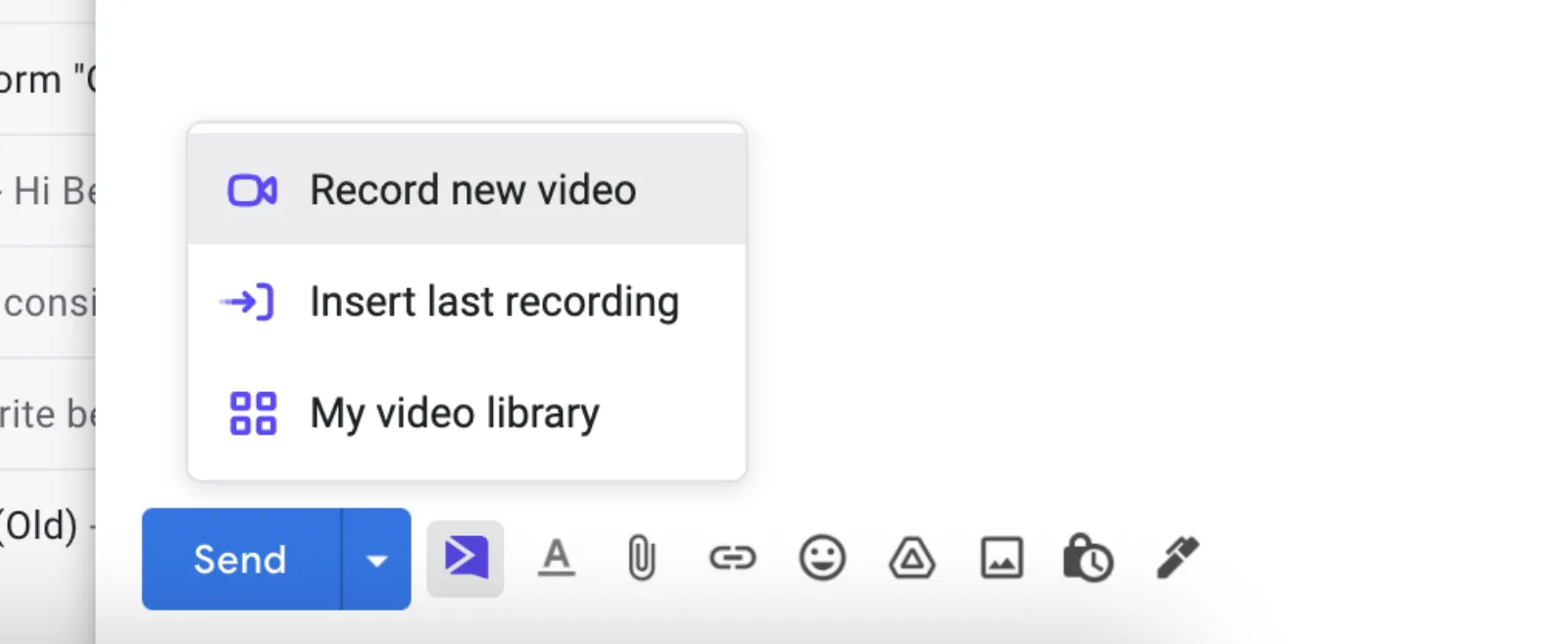
With the Sendspark Chrome extension installed, start a new email. The Sendspark logo appears in the options at the bottom of the draft, next to Send.

- 2
Click Record new video
Choose Record new video to record yourself or your screen, or pick Insert last recording or My video library to reuse a video you already have.
- 3
Stop and preview
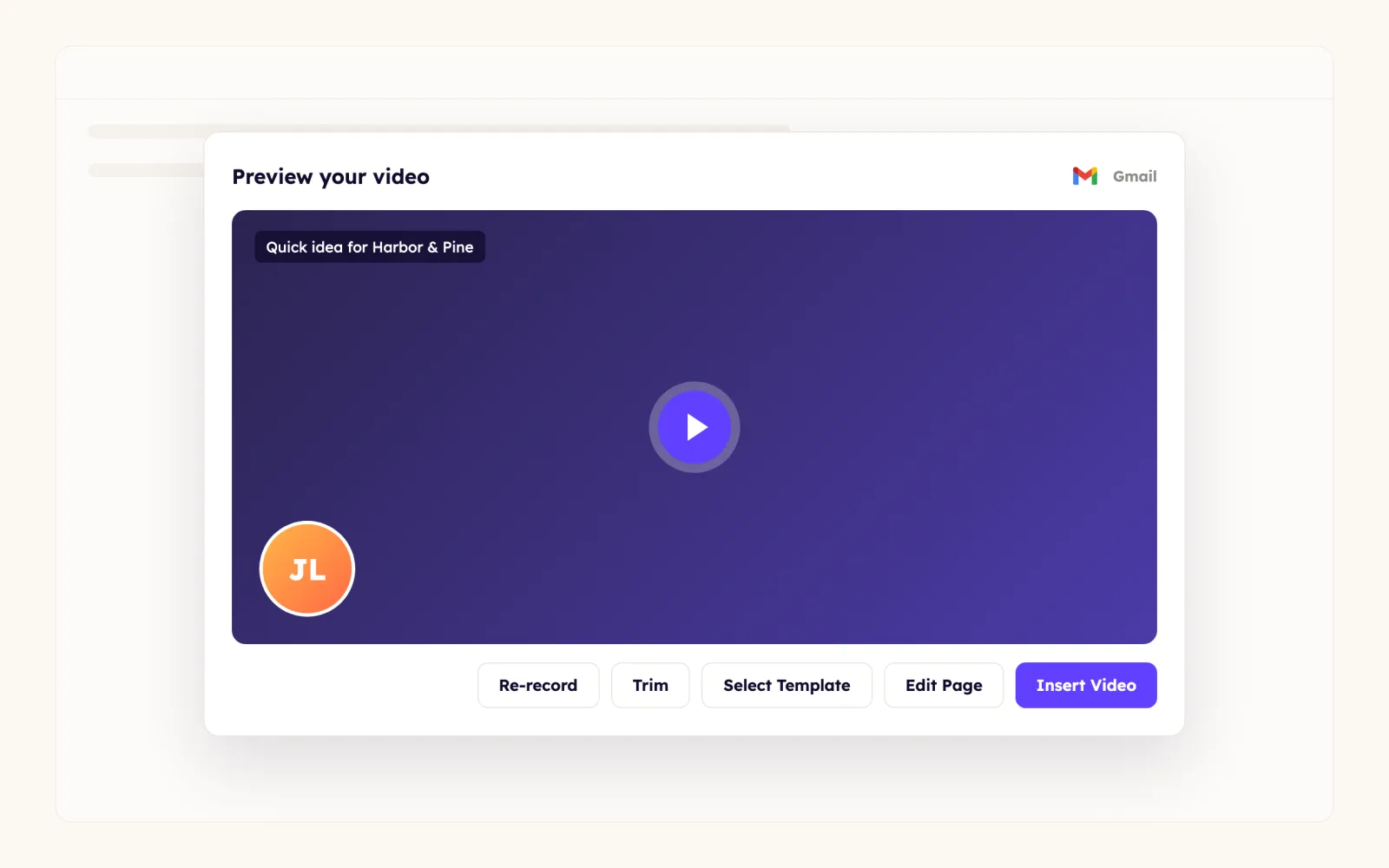
Click the Sendspark extension icon in the browser toolbar to finish. A preview opens; click Edit Page if you want to change the landing page or thumbnail, and then copy and paste the video into Gmail instead of inserting it.
- 4
Insert the video
Click Insert Video. Gmail doesn't play embedded video, so your recipient sees an animated GIF preview and clicks it to watch the full video in the browser.
- 5
Or paste a video you recorded earlier
In Sendspark, click Share Video, then Copy Linked GIF, and paste it into your Gmail draft.
What teams do with Sendspark and Gmail
Every prospect gets their own video, sent from your Gmail
Create a Dynamic Campaign, then an Agentic Workflow with the Sendspark New Video Generated trigger and the Gmail Send an Email action. Set the format to HTML, the To field to #{{contact.email}}, and drop the Email Embed HTML block into the body, using <br> and <p> for spacing since raw HTML has no line breaks.
Read the guideBulk video sends without a sales email tool
If you don't use a CRM or sequencer, the Gmail workflow is the bulk send: add contacts or generate videos and each one goes out from your own mailbox as soon as it's ready.
Read the guideA video in every email you send
Record a short intro, build a thumbnail with a play button from the provided templates, and add the hyperlinked image to your Gmail signature. You can re-record later in Sendspark without changing the link.
Read the guideShow the prospect's website, not gmail.com
Sendspark won't skip free email domains when it builds a background on its own. If your contacts come from HubSpot, create a Background URL property and a workflow that falls back to your own site, then map it on import.
Read the guideWhat Gmail data personalizes each video
- In the Agentic Workflow email, map the contact's first name and the Email Embed HTML from the New Video Generated step; the To field takes #{{contact.email}}.
- Insert Video and Copy Linked GIF both use an animated GIF thumbnail with a play button that links to the video's landing page.
- Personalized thumbnails can overlay merge tags such as the prospect's name and their company logo (Solo and above).
- AI voice cloning says each prospect's name in your voice (Solo and above); multiple AI variables per video need Growth and above.
Where you see who watched from Gmail
Sendspark's video analytics show who viewed, how much they watched, CTA clicks and likes, with view notifications. Nothing is written back to Gmail.
Explore Video AnalyticsSendspark and Gmail: frequently asked questions
Does Sendspark integrate with Gmail?
Yes. Install the Sendspark Chrome extension and the Sendspark logo appears in Gmail's compose window, so you can record and insert a video without leaving your draft. Agentic Workflows can also send personalized videos through your connected Gmail account.
Can a video play inside a Gmail email?
No. Gmail doesn't support embedded video, so Sendspark inserts an animated GIF preview that opens the full video in the browser when clicked.
Can I send personalized videos in bulk from Gmail?
Yes, with an Agentic Workflow (Growth and above) that triggers on New Video Generated and uses Gmail's Send an Email action, so each contact gets their own video from your account.
Why don't I see the Sendspark icon in Gmail?
You need the Sendspark Chrome extension and a Chrome browser. If it's installed, check that the Gmail toggle is on in your Sendspark integration settings; turning it off only affects you, not your teammates.
Updated


Make your next outreach personal.
Record one video and let Sendspark do the rest.
