Sendspark LinkedIn integration for personalized video messages
Sendspark's LinkedIn integration is an instant integration: with the Sendspark Chrome extension installed, a Sendspark icon appears in the LinkedIn message composer, so you can record a video and insert it into Direct Messages, InMail and Sales Navigator without leaving the page. You can also place one recording over each prospect's LinkedIn profile as a dynamic background. Sendspark is an AI personalized video platform for B2B sales and marketing teams.
 SOC 2 Type II
- Read reviews on G2


Sendspark and LinkedIn at a glance
- Integration type
- Instant integration (Chrome extension) plus LinkedIn-profile video backgrounds
- How data moves
- You record from LinkedIn's composer and Sendspark inserts a share link that LinkedIn unfurls into a thumbnail. For profile backgrounds, you connect your LinkedIn session to Sendspark with your li_at cookie. Nothing is written back to LinkedIn; views are tracked in Sendspark.
- What you need
- The Sendspark Chrome extension in a Chrome browser; for profile backgrounds, your LinkedIn li_at cookie value
- Setup guides
- On LinkedIn's side
- About LinkedIn
Your LinkedIn messages look like every other pitch in the inbox
Text-only DMs and InMails blur together for a buyer who's skimming dozens of them, so good research still gets ignored. Recording a video for each person would fix it, but leaving LinkedIn to record, upload and paste a link breaks your flow, so it rarely happens.
How to use Sendspark with LinkedIn
- 1
Open a LinkedIn message
With the Sendspark Chrome extension installed, start a new message. The Sendspark icon shows in the toolbar at the bottom of the compose window in Direct Messages, InMail and Sales Navigator.
- 2
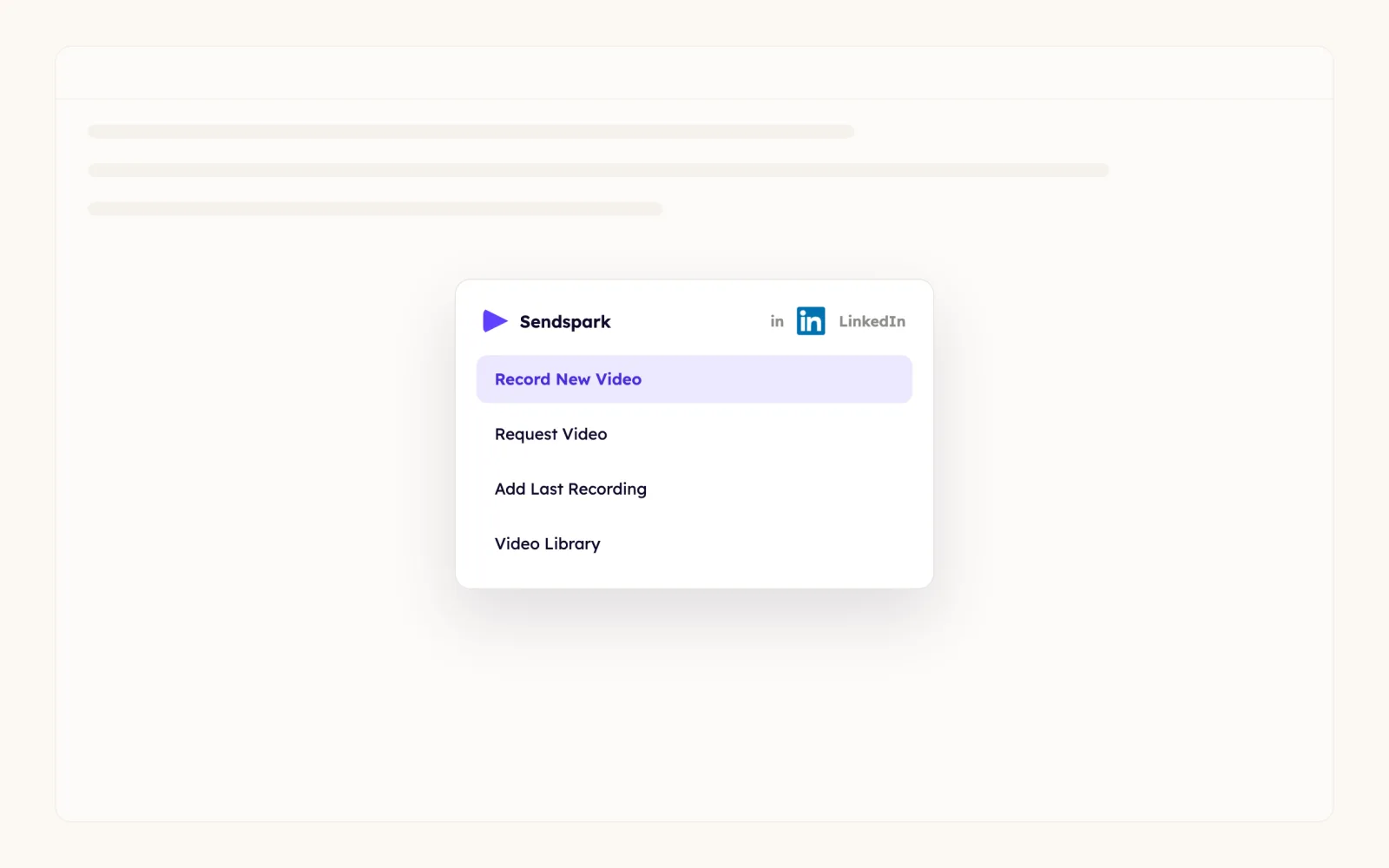
Choose Record New Video
Click the Sendspark icon and pick Record New Video to record yourself, your screen or both. The same menu offers Request Video, Meet Now, Send Calendar, Add Last Recording and Video Library.
- 3
Stop and preview
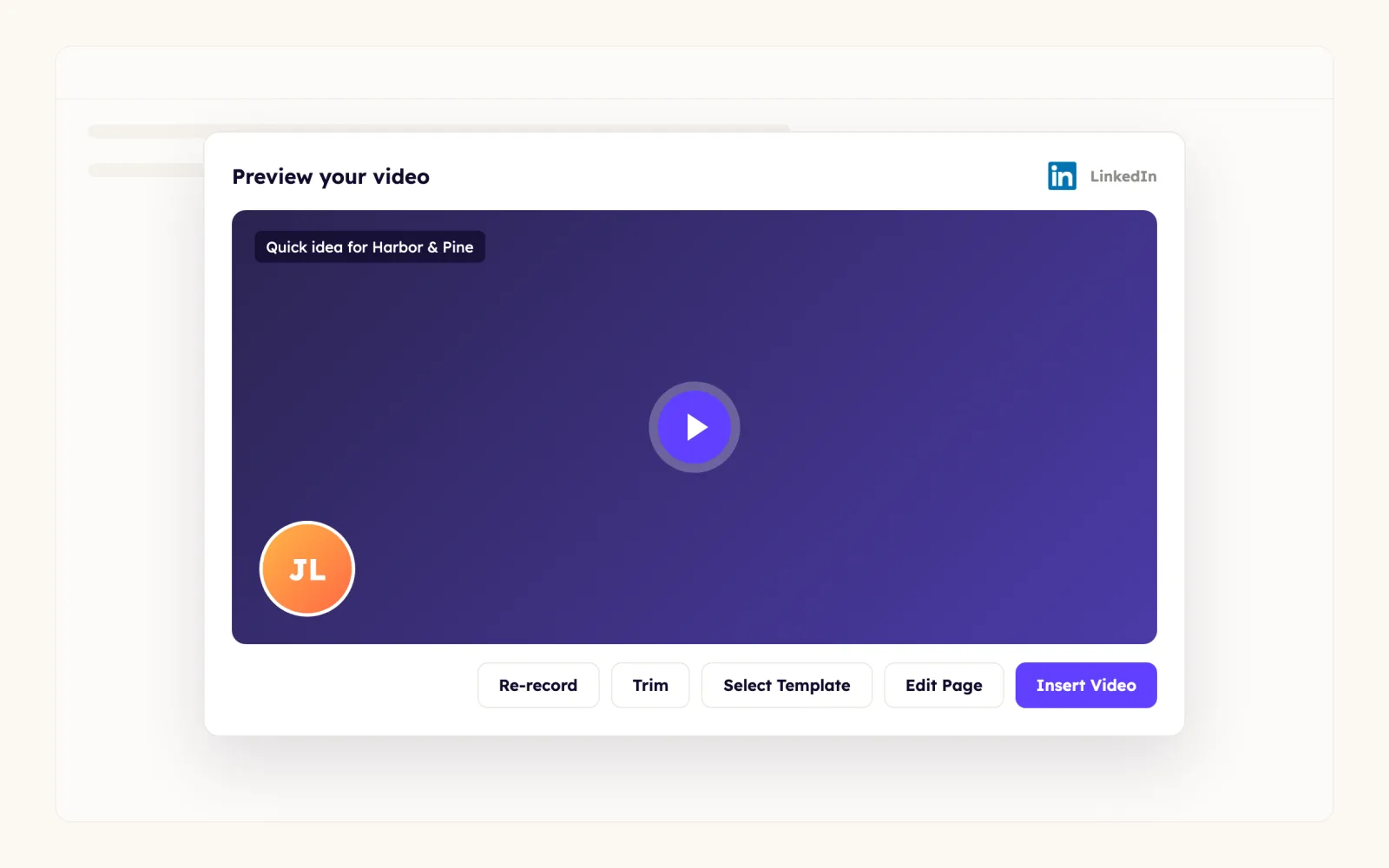
Click the Sendspark extension icon in the browser toolbar to end the recording. A preview opens where you can re-record, or click Edit Page / Thumbnail to change the landing page; if you do, you'll copy and paste the link into LinkedIn instead of inserting it.
- 4
Click Insert Video
Insert Video drops a Sendspark share link into your message. LinkedIn turns it into an image preview, and the recipient clicks it to watch on your video page.
- 5
Connect LinkedIn for profile backgrounds
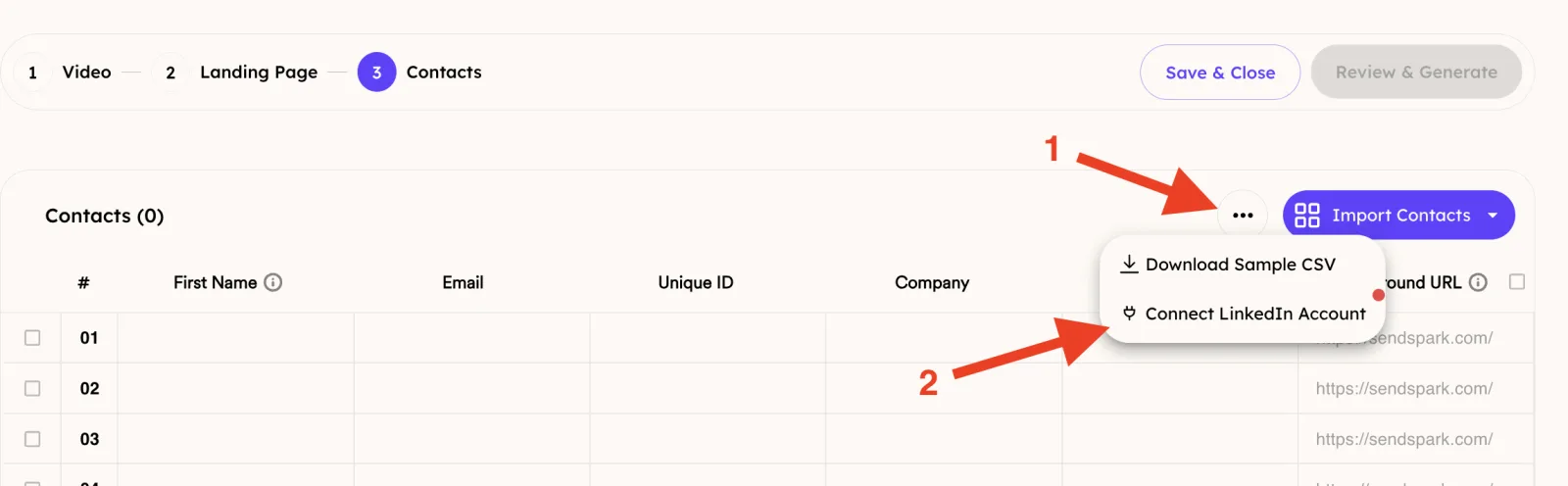
In a Dynamic Video campaign, go to the Contacts step, open the ... menu and click Connect LinkedIn Account.
- 6
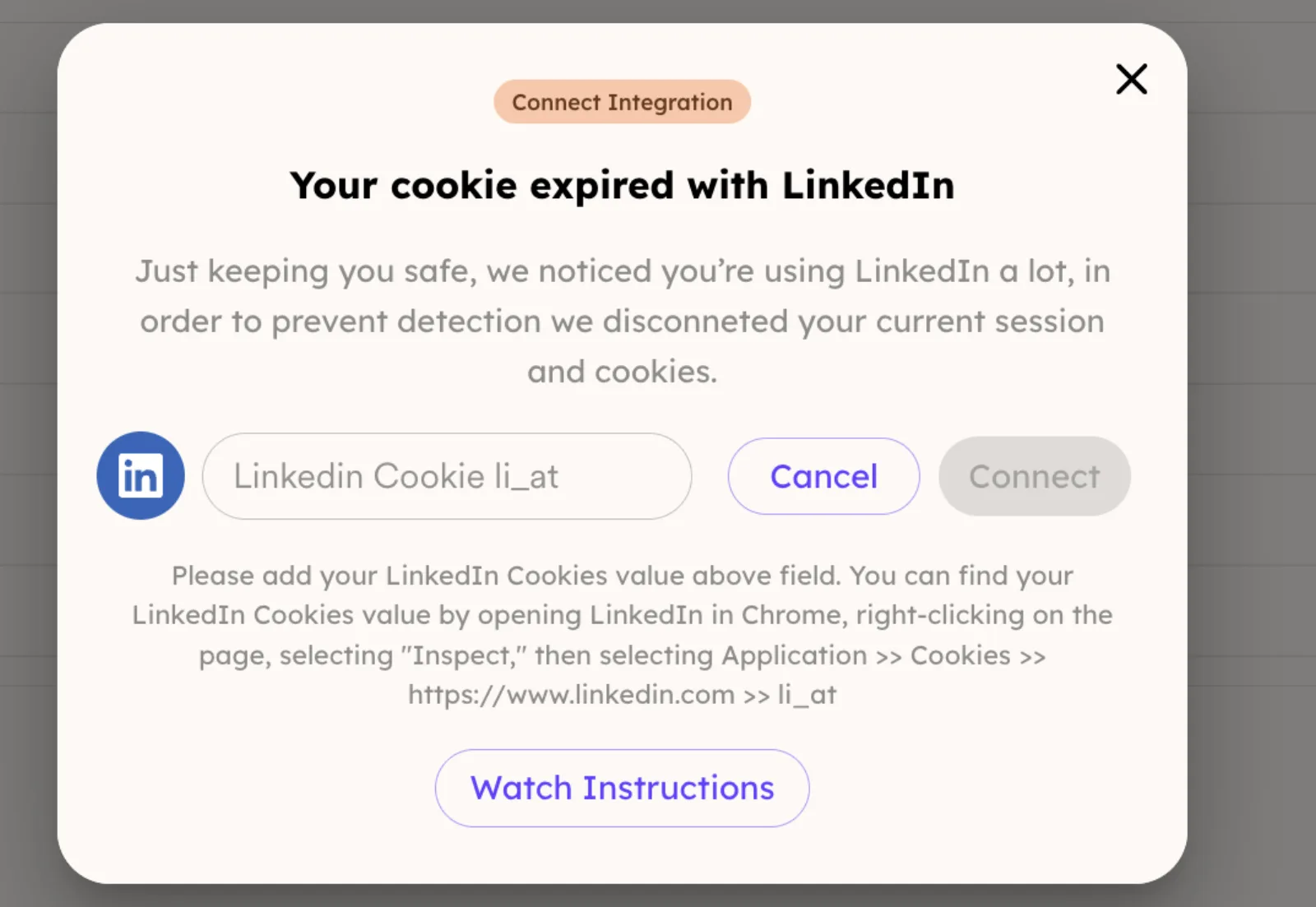
Paste your li_at cookie and add profile URLs
Copy li_at from Chrome Developer Tools (Application > Cookies > https://www.linkedin.com), paste it into the popup and click Connect. Then put each prospect's LinkedIn URL in the Background URL column.
What teams do with Sendspark and LinkedIn
Every prospect sees you talking over their own LinkedIn profile
Record one video, add each prospect's LinkedIn URL in the Background URL field, and Sendspark places your recording over every profile. LinkedIn can temporarily block rapid profile fetches, so generate in small daily batches; if videos fail, wait a day or two and reset your cookie before retrying.
Read the guideThumbnails that greet each connection by name
Whatever you type in the landing page header shows on the LinkedIn thumbnail, so add the firstname merge tag there. Leave the header empty and the thumbnail reads "created with Sendspark" instead. Insert through the Chrome extension, because pasting the raw video link drops the personalization.
Read the guideDynamic videos inside your LinkedIn automation tool
Any LinkedIn outreach tool that takes a CSV upload and lets you map a video link to a message placeholder works with Sendspark. Download your campaign's CSV and map the video_link column; written guides cover Expandi, HeyReach, La Growth Machine, lemlist, Linked Helper and Skylead.
Read the guideWhat LinkedIn data personalizes each video
- The firstname merge tag in the landing page Header (for example Hey {{firstname | there}}) appears on the LinkedIn thumbnail; banners don't carry personalization.
- Each prospect's LinkedIn profile URL in the Background URL field becomes the background behind your recording.
- AI voice cloning can say each prospect's name in your voice (Solo and above).
- LinkedIn caches link previews: to fix a thumbnail after sending, duplicate or regenerate the video so you get a fresh link.
- A custom domain (Growth and above) replaces sendspark.com at the bottom of the thumbnail.
Where you see who watched from LinkedIn
Sendspark's video analytics show who viewed, how much they watched, CTA clicks and likes, and you get notified when a recipient engages. Nothing is written back to LinkedIn.
Explore Video AnalyticsSendspark and LinkedIn: frequently asked questions
Does Sendspark integrate with LinkedIn?
Yes. It's an instant integration through the Sendspark Chrome extension: a Sendspark icon appears in the LinkedIn composer, and you can record and insert videos in Direct Messages, InMail and Sales Navigator.
Why don't my video thumbnails show in Sales Navigator?
In Sales Navigator and Recruiter it can look like previews are missing, but thumbnails do show for 1st-degree connections and people who've accepted your InMail. Sending to non-connections can lead LinkedIn to block the thumbnail.
Can I edit a video after I've sent it on LinkedIn?
Not through the same link. LinkedIn caches the preview, so changes won't show; duplicate the video in Sendspark to get a new link and send that.
Why did my LinkedIn-background videos fail to generate?
LinkedIn may temporarily block requests when too many profiles are fetched in a short time. Wait 24 to 48 hours, reset your li_at cookie in Sendspark, then generate in smaller batches.
Can I send Sendspark videos from a LinkedIn automation tool?
Yes, if the tool lets you upload a CSV and map a video link to a dynamic placeholder in a message. Download the CSV from your Dynamic Video campaign and map video_link.
Updated


Make your next outreach personal.
Record one video and let Sendspark do the rest.
