Key Takeaways
- AI-personalized videos generate 200-300% higher response rates than text-only emails, making them the highest-ROI format for sales outreach (Sendspark customer data).
- Most email clients enforce a 20-25 MB attachment limit — the best approach is embedding a clickable thumbnail that links to a hosted video, not attaching the file directly.
- Personalized video at scale is now possible with AI tools that clone your voice and customize backgrounds for each prospect automatically.
- Tracking video analytics (opens, play rate, watch time, CTA clicks) lets you prioritize follow-ups with the most engaged prospects.
- The five proven methods covered in this guide range from simple link-sharing to fully automated, CRM-integrated video email platform workflows.
What Is AI-Personalized Video and Why Does It Outperform Text?
AI-personalized video is the practice of including a video message inside an email — either as an embedded thumbnail, an animated GIF preview, or a hosted link — to communicate with prospects, customers, or colleagues. AI-personalized videos consistently outperform text-only messages because they combine visual engagement, vocal tone, and personal presence in a format that stands out in crowded inboxes.
Sales teams using AI-personalized video in their outreach report 200-300% higher response rates and book 40-50% more meetings (Sendspark customer data). The reason is straightforward: when a prospect sees your face and hears your voice, trust forms faster than it ever can through text alone.
AI-personalized video works across every stage of the sales funnel. At the top, cold outreach videos capture attention and earn replies. In the middle, personalized demos and proposal walkthroughs accelerate deal velocity. At the bottom, customer success teams use video for onboarding, quarterly business reviews, and renewal conversations. According to Wyzowl's State of Video Marketing report, 93% of video marketers say video has helped increase user understanding of their product or service.
The shift to AI-personalized video is not a trend — it is a structural change in how B2B communication works. As AI tools make it possible to create AI-powered video intros personalized to each recipient, the barrier to entry has dropped dramatically. Sales reps no longer choose between personalization and scale. They get both.
How to Send a Video Through Email: 5 Proven Methods
There are five reliable ways to send a video through email, each suited to different use cases, technical skill levels, and scale requirements. The best method for you depends on whether you are sending a one-off message or running a campaign with hundreds of personalized videos. Here is a breakdown of every approach, ranked from simplest to most powerful.
Method 1: Paste a Video Link
The simplest approach is to upload your video to a hosting platform and paste the link directly into your email body. This works with any email client and avoids attachment size limits entirely. The downside is that a raw URL looks unprofessional and gives you no analytics on who actually watched. This method works for quick internal communications but is not recommended for sales outreach.
Method 2: Embed an Animated GIF Thumbnail
A more effective technique is creating an animated GIF thumbnail from your video and embedding it in the email body. The GIF acts as a visual teaser — when the recipient clicks it, they are taken to the full video on a landing page. This method can lift click-through rates because the motion in the GIF catches the eye.
Method 3: Use a AI-personalized video Platform
Dedicated video email platforms handle recording, hosting, thumbnail generation, and analytics in one workflow. You record your video (or use an AI-generated version), and the platform creates a branded email with a clickable thumbnail, custom landing page, and call-to-action button. This is the standard approach for B2B sales teams because it combines professional presentation with detailed engagement tracking.
Method 4: Integrate Video into Your Sales Sequencer
For teams running multi-touch outreach campaigns, the most efficient approach is integrating video directly into your sales sequencer. Platforms like Outreach, SalesLoft, and Apollo support video steps within automated sequences. You record a template video once, and the system inserts personalized thumbnails and landing pages for each prospect in the sequence. This scales video outreach without requiring reps to record individual messages.
Method 5: AI-Personalized Video at Scale
The most advanced method uses AI to personalize a single recording for every recipient automatically. With tools like Sendspark, you record one video and the AI personalizes it with each prospect's name (via AI voice cloning), their company website as a dynamic background, and custom landing page details. This delivers the engagement of a 1:1 video with the efficiency of a mass campaign — and it saves sales teams 10+ hours per campaign.
| Method | Best For | Personalization | Analytics | Scalability |
|---|---|---|---|---|
| Paste a link | Quick internal messages | None | None | High |
| GIF thumbnail | Marketing newsletters | Low | Click tracking only | Medium |
| AI-personalized video platform | Sales outreach (1:1) | Medium | Full (opens, plays, watch time) | Medium |
| Sales sequencer integration | Multi-touch campaigns | Medium-High | Full + CRM sync | High |
| AI-personalized video | Scaled personalized outreach | High (AI voice + dynamic BG) | Full + CRM sync | Very High |
Pro Tip: Start with Method 3 (AI-personalized video platform) to learn the basics, then graduate to Method 5 (AI personalization) once you have proven that video improves your reply rates. Most teams see the ROI within their first week.
What Are Email Video Size Limits and How Do You Work Around Them?
Every major email provider enforces attachment size limits that make sending video files directly nearly impossible for anything beyond a few seconds of footage. Gmail and Google Workspace cap attachments at 25 MB. Outlook allows 20 MB. Yahoo permits 25 MB. A single minute of 1080p video recorded on a modern smartphone typically runs 100-150 MB — far exceeding every provider's limit.
This is why attaching video files to emails is almost never the right approach for sales teams. Even if you compress the file small enough to attach, most corporate email servers will block or quarantine large attachments. The recipient's experience suffers: slow downloads, potential format incompatibility, and no way for you to track whether they actually watched.
The solution is hosted video with thumbnail embedding. Instead of attaching the file, you host the video on a platform and embed a clickable image or GIF in the email body. When the recipient clicks, they are taken to a lightweight landing page where the video plays instantly. This approach has zero size limitations, works across every email client, and gives you complete analytics.
| Email Provider | Attachment Size Limit | Video at 1080p (~2 MB/sec) | Max Video Length as Attachment |
|---|---|---|---|
| Gmail / Google Workspace | 25 MB | ~12 seconds | Not practical |
| Outlook / Microsoft 365 | 20 MB | ~10 seconds | Not practical |
| Yahoo Mail | 25 MB | ~12 seconds | Not practical |
| Apple Mail (iCloud) | 20 MB (Mail Drop for larger) | ~10 seconds | Mail Drop up to 5 GB |
| Hosted video link (Sendspark) | No limit | Unlimited | Unlimited |
Common Mistake: Never attach a video file directly to a sales email. Even if it is under the size limit, attachments trigger spam filters, slow delivery, and provide zero engagement tracking. Always use a hosted link with a clickable thumbnail instead.
Stop Wrestling with Email Size Limits
Sendspark hosts your videos, generates clickable thumbnails, and tracks every view — with zero attachment hassles.
Try Sendspark Free →How Do You Send Large Video Files via Email Without Losing Quality?
Sending large video files via email without sacrificing quality requires a hosting-first approach rather than compression-first. When you compress a video aggressively to fit within email size limits, you lose resolution, introduce artifacts, and degrade the professional impression you are trying to make. The better strategy is to keep the full-quality video intact and deliver it through a hosted link.
Here is the recommended workflow for sending large video files:
Step 1: Record at the right settings. For sales videos, 1080p at 30fps provides the best balance of quality and file size. Recording at 4K creates unnecessarily large files without visible quality gains on a laptop or phone screen. Use H.264 encoding (the most universally compatible codec) and target a bitrate of 5-8 Mbps for crisp, professional results.
Step 2: Upload to a video hosting platform. Rather than trying to shrink the file, upload it at full quality to a platform that handles adaptive streaming. Sendspark, for example, automatically transcodes your video into multiple quality levels and delivers the optimal version based on each viewer's connection speed. This means your prospect always sees the best possible quality.
Step 3: Generate a branded thumbnail. Your hosting platform should create a custom thumbnail — ideally an animated GIF showing 2-3 seconds of your video. This thumbnail gets embedded in the email and serves as the click target. The visual motion is what drives the click-through rate increase.
Step 4: Embed and send. Insert the thumbnail into your email via your Gmail integration, Outlook add-in, or sales sequencer. The thumbnail links to a branded landing page where the full video plays. Your prospect gets a seamless experience, and you get complete analytics on their engagement.
For teams that need to share raw video files (for editing or archival purposes, not for sales outreach), cloud storage links from Google Drive, Dropbox, or OneDrive work well for files up to 5-15 GB. But for sales communication, hosted video with embedded thumbnails is always the superior approach because it combines quality delivery with engagement tracking.
Quick Tip: Keep your sales videos between 30-90 seconds for cold outreach and 2-3 minutes for demo follow-ups. Shorter videos are more likely to be watched to the end.
What Is the Best Way to Send Personalized AI-Personalized Videos at Scale?
The best way to send personalized AI-personalized videos at scale is to use an AI-powered video platform that automates personalization from a single recording. Instead of recording a unique video for every prospect — which is effective but unsustainable beyond a handful of contacts — AI personalization lets you record once and generate hundreds or thousands of individually customized videos automatically.
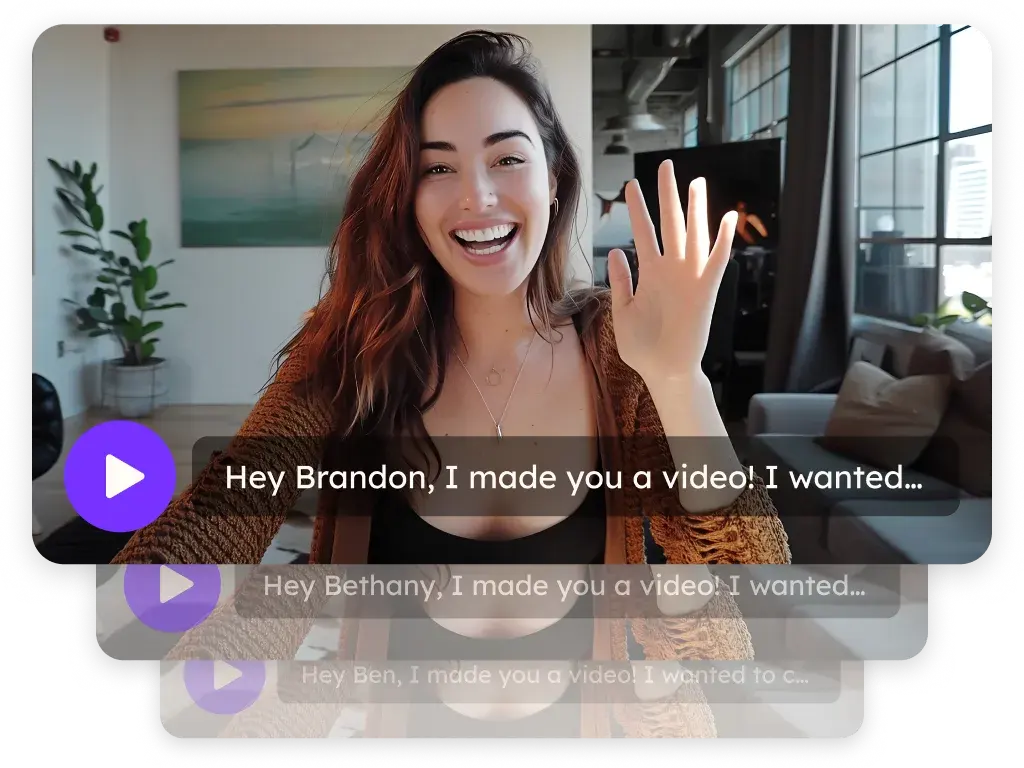
Here is how modern AI video personalization works in practice. You record a base video: your standard pitch, demo walkthrough, or introduction. The AI then customizes three elements for each recipient: a personalized greeting using AI voice cloning (your actual voice saying each prospect's name), a dynamic video background showing the prospect's website or LinkedIn profile, and a custom landing page with their company name and a tailored CTA.
The result is a video that feels completely one-to-one — the prospect hears their name in your voice and sees their own website behind you — but it only took you one recording session. Sales teams using this approach report a 2:1 meeting-to-reply ratio, meaning half of all prospects who respond to the video end up booking a meeting (Sendspark customer data). That is roughly double the conversion rate of text-only outreach.
To implement this at scale, the workflow typically looks like this:
1. Build your prospect list in your CRM or sales tool (HubSpot, Salesforce, Apollo, Clay).
2. Record your base video using a platform like Sendspark. One take, 60-90 seconds.
3. Connect your data source. Map prospect fields (first name, company, website URL) to the AI personalization engine.
4. Generate personalized videos in batch. The platform creates a unique video for each prospect in minutes.
5. Insert into your sequence. Use your automated video workflows to drop personalized videos into Outreach, SalesLoft, or HubSpot sequences automatically.
Personalized content earns more engagement than generic alternatives. When that personalization extends to video — where the prospect literally hears their own name and sees their company — the impact is even more pronounced. This is why AI-personalized video has become the default prospecting method for high-performing B2B sales teams.
How Do You Track AI-Personalized Video Performance and Measure ROI?
AI-personalized video tracking measures four key metrics that tell you exactly how prospects are engaging with your videos: email opens, video plays, watch time (percentage viewed), and CTA clicks. Unlike text emails where you can only see opens and link clicks, AI-personalized videos provide a richer engagement signal that helps you prioritize the hottest leads for follow-up.
Here is what each metric tells you and how to use it:
Email open rate confirms your subject line worked. If you are using video email subject lines that boost open rates, expect 40-60% opens for targeted outreach (versus 20-25% for generic cold email).
Video play rate shows whether your thumbnail was compelling enough to earn a click. A healthy play rate is 40-65% of opens. If your play rate is below 30%, your thumbnail or the first frame of your video needs improvement.
Watch time (completion rate) reveals how engaging your content is. For a 60-second prospecting video, aim for 60%+ completion. If viewers consistently drop off at the 15-second mark, your opening is not hooking them quickly enough.
CTA click rate measures conversion intent. This is the prospect clicking your calendar link, demo request, or pricing page. A 10-20% CTA click rate (of video viewers) is strong. This is where the real pipeline value lives.
The most impactful use of video analytics is intent-based follow-up. When your video analytics dashboard shows a prospect watched 80% of your demo video and clicked your CTA, that is a buying signal. Following up within 24 hours of a high-engagement view, while the video is fresh in the prospect's mind, gives you the best chance to convert that interest.
For accurate ROI measurement, connect your video platform to your CRM. The HubSpot video integration syncs video engagement data directly to contact records, so you can attribute closed deals back to specific video touchpoints. This gives you a clear cost-per-meeting and revenue-per-video metric that justifies continued investment in video outreach. For more detailed guidance, see this resource on tracking video ROI metrics for sales teams.
What Are the Most Common AI-Personalized Video Mistakes to Avoid?
Even teams that embrace AI-personalized video often make avoidable mistakes that undercut their results. Knowing what not to do is just as important as knowing the right techniques. Here are the seven most common AI-personalized video mistakes and how to fix each one.
Mistake 1: Attaching the video file directly. As covered above, this triggers size limits, spam filters, and kills your ability to track engagement. Always use hosted video with embedded thumbnails instead.
Mistake 2: Making videos too long. Sales videos over 3 minutes see steep drop-offs in completion rates. Keep cold outreach videos under 90 seconds and follow-up videos under 3 minutes. According to Demand Gen Report, B2B buyers prefer short, focused content that respects their time.
Mistake 3: Using a generic thumbnail. A static, blurry, or auto-generated thumbnail fails to earn clicks. Use a custom thumbnail — ideally an animated GIF — that shows your face and creates curiosity. Consider creating video email examples that increase click-through rates as inspiration.
Mistake 4: Not personalizing the video. A generic video blast feels impersonal and gets ignored. At minimum, say the prospect's name and reference their company. With AI tools, this personalization is automated and takes zero extra time per prospect.
Mistake 5: Skipping the CTA. Every sales video needs a clear next step — book a meeting, reply to this email, visit a pricing page. Videos without a CTA generate views but not pipeline. Place your CTA both verbally (at the end of the video) and visually (as a button on the landing page).
Mistake 6: Ignoring video analytics. If you are not reviewing who watched, how long they watched, and whether they clicked your CTA, you are flying blind. Video analytics are the key advantage over text email — use them for sales prospecting with video prioritization.
Mistake 7: Not integrating with your CRM. Video engagement data trapped in a standalone tool is far less valuable than data flowing into your CRM timeline. Ensure your video platform syncs with your CRM so every rep has context when they follow up. The Chrome extension for recording makes it easy to capture and send videos without leaving your browser.
Quick Tip: Write your AI-personalized video subject line to create curiosity without mentioning the word "video." Subject lines like "Quick question about [Company]" or "Idea for [prospect's goal]" outperform "I made you a video" by 2-3x in open rates. See more personalized video email tools and strategies for optimization.
Frequently Asked Questions
Can you embed a video directly in an email?
Most email clients (Gmail, Outlook, Yahoo) do not support inline video playback. The standard practice is to embed a clickable thumbnail image or animated GIF that links to a hosted video on a landing page. This works reliably across all email clients and provides better analytics than embedded playback would.
What is the maximum video file size you can email?
Gmail allows 25 MB attachments, Outlook allows 20 MB, and Yahoo allows 25 MB. Since one minute of 1080p video is typically 100-150 MB, direct attachment is impractical for anything beyond a few seconds. Use a hosted video link instead — there are no size limits when you share a link to a hosted video.
How long should a sales AI-Personalized Video be?
For cold outreach, keep videos between 30-90 seconds. For warm follow-ups and demos, 2-3 minutes is appropriate. Shorter videos are more likely to be watched to the end. Always front-load your key message in the first 10 seconds.
Do AI-Personalized Videos actually get higher response rates?
Yes. Sales teams using AI-personalized video in email outreach consistently report 200-300% higher response rates compared to text-only emails (Sendspark customer data). Video also generates a 2:1 meeting-to-reply ratio, meaning half of prospects who respond to a AI-personalized video end up booking a meeting.
What is the best format for AI-Personalized Videos?
Use an animated GIF thumbnail (3-5 seconds, under 1 MB) embedded in the email body that links to a full video hosted on a landing page. The GIF catches attention with motion, and the landing page provides a distraction-free viewing experience with your CTA prominently displayed.
How do you send a video through Gmail?
In Gmail, you can attach a video file up to 25 MB or paste a link. For professional sales outreach, use a Gmail integration for video that inserts a branded, trackable video thumbnail directly into your compose window. This gives you engagement analytics and a professional presentation.
Is it better to send a video link or attachment?
A hosted video link is always better than an attachment for sales emails. Links avoid size limits, prevent spam filter triggers, load faster for the recipient, and provide complete engagement analytics (opens, plays, watch time, CTA clicks). Attachments offer none of these benefits and can cause deliverability issues. Check out Sendspark pricing plans to find a video hosting solution that fits your team's needs.
Ready to Send AI-personalized videos That Get Replies?
Record once, personalize at scale with AI. Sendspark helps sales teams send trackable AI-personalized videos that book 40-50% more meetings (Sendspark customer data).
Get Started Free →No credit card required • Set up in 2 minutes