Sendspark Calendly integration: booking calendars and meeting-booked videos
Sendspark works with Calendly two ways: you embed your Calendly booking page next to any video, and an Agentic Workflow can create a personalized AI video every time someone books. Sendspark is an AI personalized video platform for B2B sales and marketing teams. The workflow uses Calendly's Invitee created event and sends the video through Gmail, Outreach or another connected channel.
 SOC 2 Type II
- Read reviews on G2


Sendspark and Calendly at a glance
- Integration type
- Calendar embed and Agentic Workflows connection
- How data moves
- Your Calendly link shows as a booking calendar on the video page. In Agentic Workflows, Calendly sends each new invitee's details to Sendspark, which creates and sends their video. Nothing is written back to Calendly.
- Plan
- Agentic Workflows: Growth and above.
- What you need
- Your Calendly scheduling link; for the workflow, a Calendly account connection and a Dynamic Video campaign.
- Setup guides
- On Calendly's side
- Sendspark on Calendly Integrations
Prospects like the video, then go quiet before they book
Watching is the easy part; finding a time takes another email and another wait. And once someone does book, the confirmation they get is a generic calendar email.
How to use Sendspark with Calendly
- 1
Turn on Calendar on the video
On your video's page settings, toggle Calendar to On.
- 2
Choose Calendly and paste your link
Pick Calendly from the Provider dropdown and paste your Calendly link, not the embed code. The calendar appears to the right of the video in the preview.
- 3
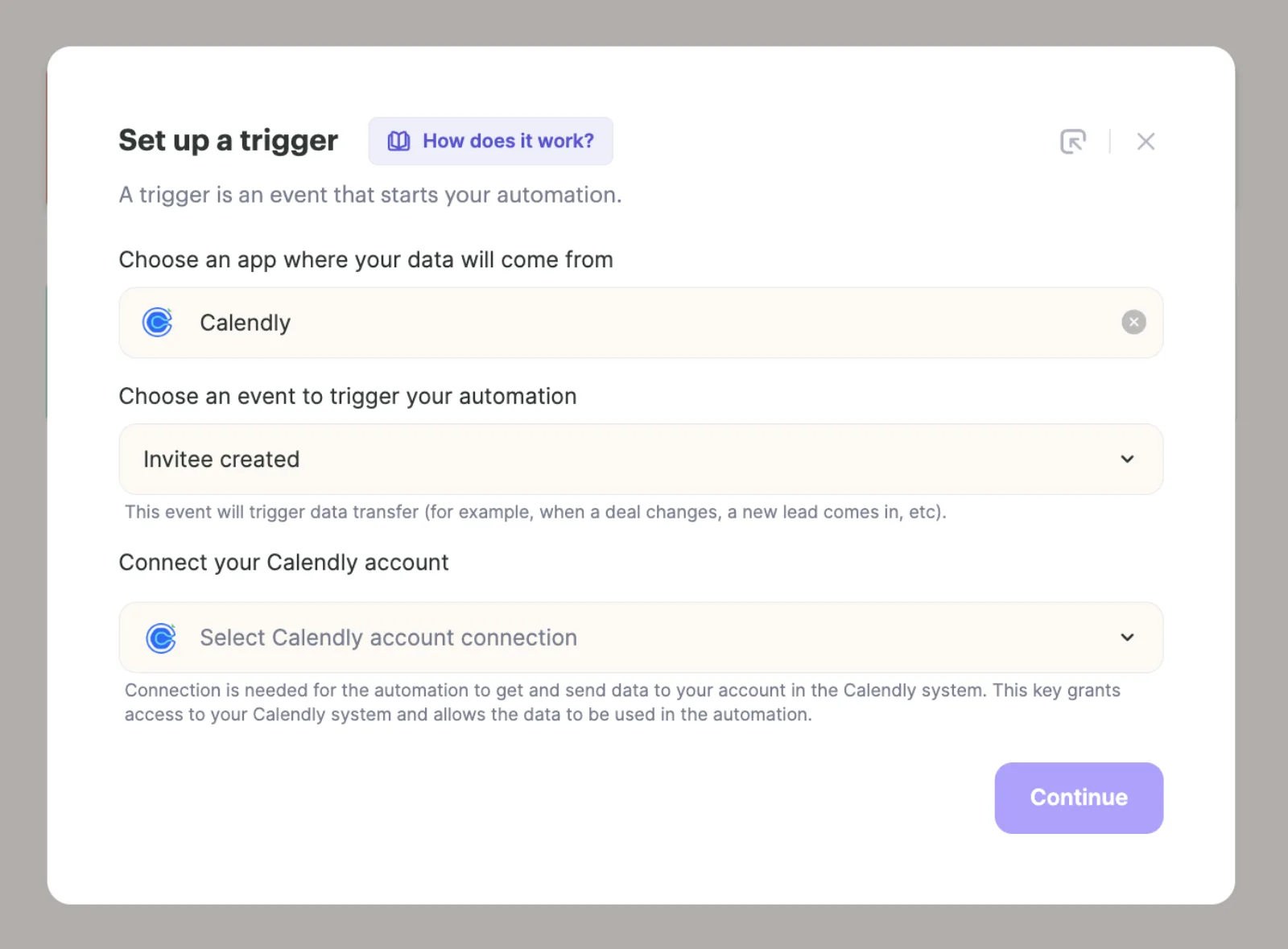
Add an Invitee created trigger
In Agentic Workflows, click New automation and set the trigger app to Calendly with the Invitee created event, then connect your Calendly account.
- 4
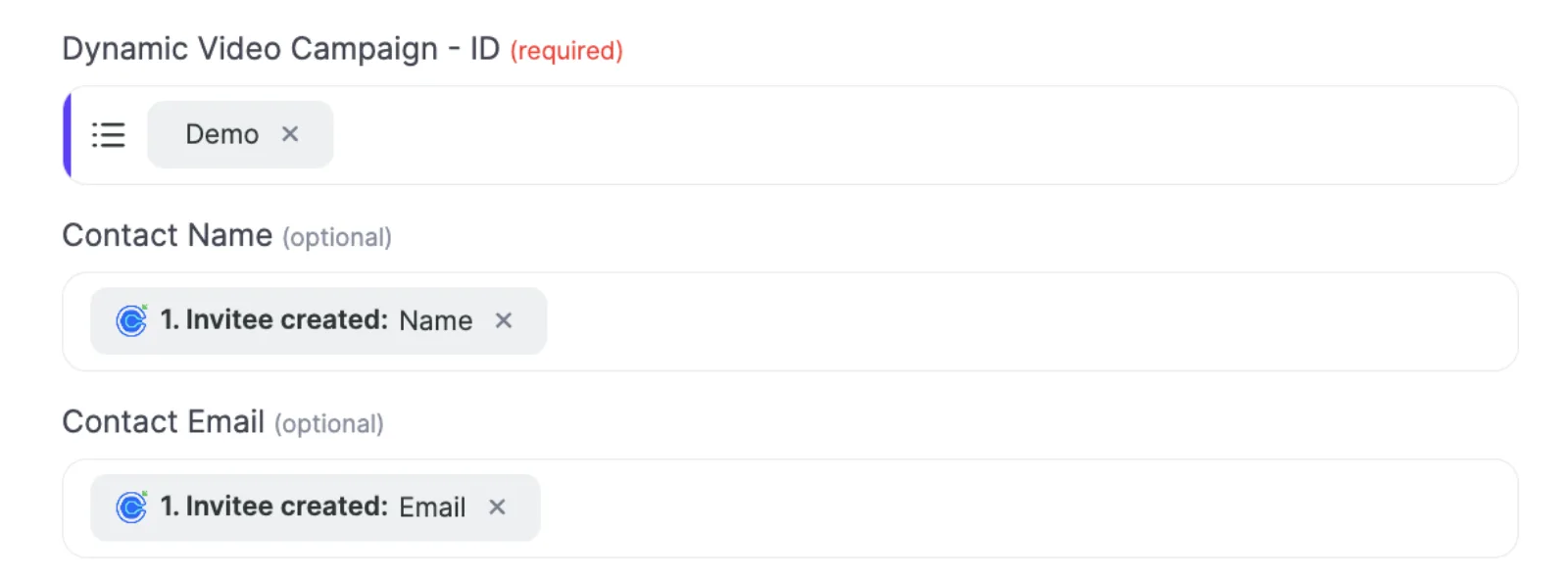
Create the video from the booking
Add the Sendspark action Create dynamic video, choose your campaign, and map the invitee's Name and Email.
What teams do with Sendspark and Calendly
Everyone who books gets a personal video before the meeting
After Create dynamic video, add a Gmail or Outreach send step. Set Email Format to HTML and put the Email Embed HTML output in the body; the video only renders when both are set.
Read the guideEvery video ends with a way to book
Embed your Calendly calendar on video landing pages, or add a CTA button whose URL is your Calendly link, so viewers can book the moment they finish watching.
Read the guideWhat Calendly data personalizes each video
- Calendly's Name and Email from Invitee created map into the Dynamic Video campaign's contact fields.
- Invitee created fires on every booking, so use a filter on the trigger if you only want some event types.
- Paste the Calendly link, not the embed code; Sendspark builds the embed from the link.
Where you see who watched from Calendly
Views, watch time, CTA clicks and likes are tracked in Sendspark. Bookings themselves live in Calendly.
Explore Video AnalyticsSendspark and Calendly: frequently asked questions
Does Sendspark integrate with Calendly?
Yes. You can embed your Calendly booking page next to any Sendspark video, and Agentic Workflows (Growth and above) can create a video each time someone books.
Which Calendly event starts the workflow?
Invitee created. It fires whenever someone books and becomes an invitee.
Why doesn't the video show in the email the workflow sends?
Set Email Format to HTML and use the Email Embed HTML output from Create dynamic video in the body; both are needed.
Updated
 HubSpotInstant integration, HubSpot app (workflow actions and CRM tracking), share snippet, Agentic Workflows connection and calendar embedExplore HubSpot
  OutreachInstant integration, share snippet, Agentic Workflows connection and calendar embedExplore Outreach
  GmailInstant integration (Insert Video) and Agentic Workflows connectionExplore Gmail
 Make your next outreach personal.
Record one video and let Sendspark do the rest.
