API, webhooks and MCP for personalized video
Create personalized videos from your own stack, react to every view and click with webhooks, and ask your AI assistant about results in plain language. Developers and ops teams use them to build Sendspark's AI personalized video platform into their own tools. API and webhooks are on Growth and above.
 SOC 2 Type II
- Read reviews on G2
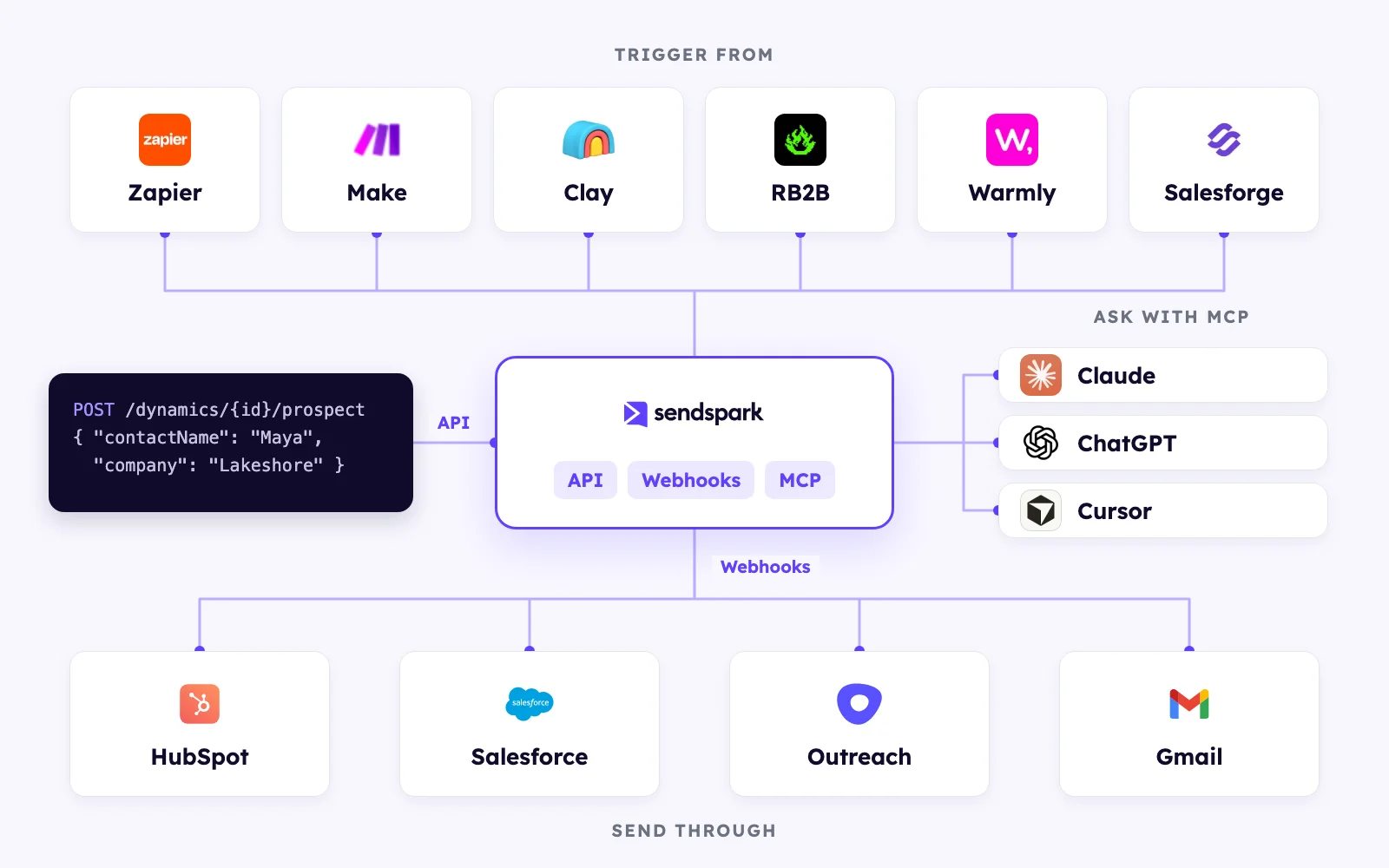
Generate videos from your own systems, no manual step
Add a prospect to a dynamic video campaign, and Sendspark generates a personalized video and its landing page for that person. API access is available on Growth and above.
# Add a prospect to a dynamic video campaign
curl -X POST https://api-gw.sendspark.com/v1/workspaces/$WORKSPACE_ID/dynamics/$DYNAMIC_ID/prospect   -H "x-api-key: $SENDSPARK_API_KEY"   -H "x-api-secret: $SENDSPARK_API_SECRET"   -H "Content-Type: application/json"   -d '{ "processAndAuthorizeCharge": true,
        "prospect": { "contactName": "Maya Chen", "contactEmail": "maya@brightline.example",
                      "company": "Brightline Logistics", "backgroundUrl": "https://brightline.example" } }'
React to every view and click as it happens
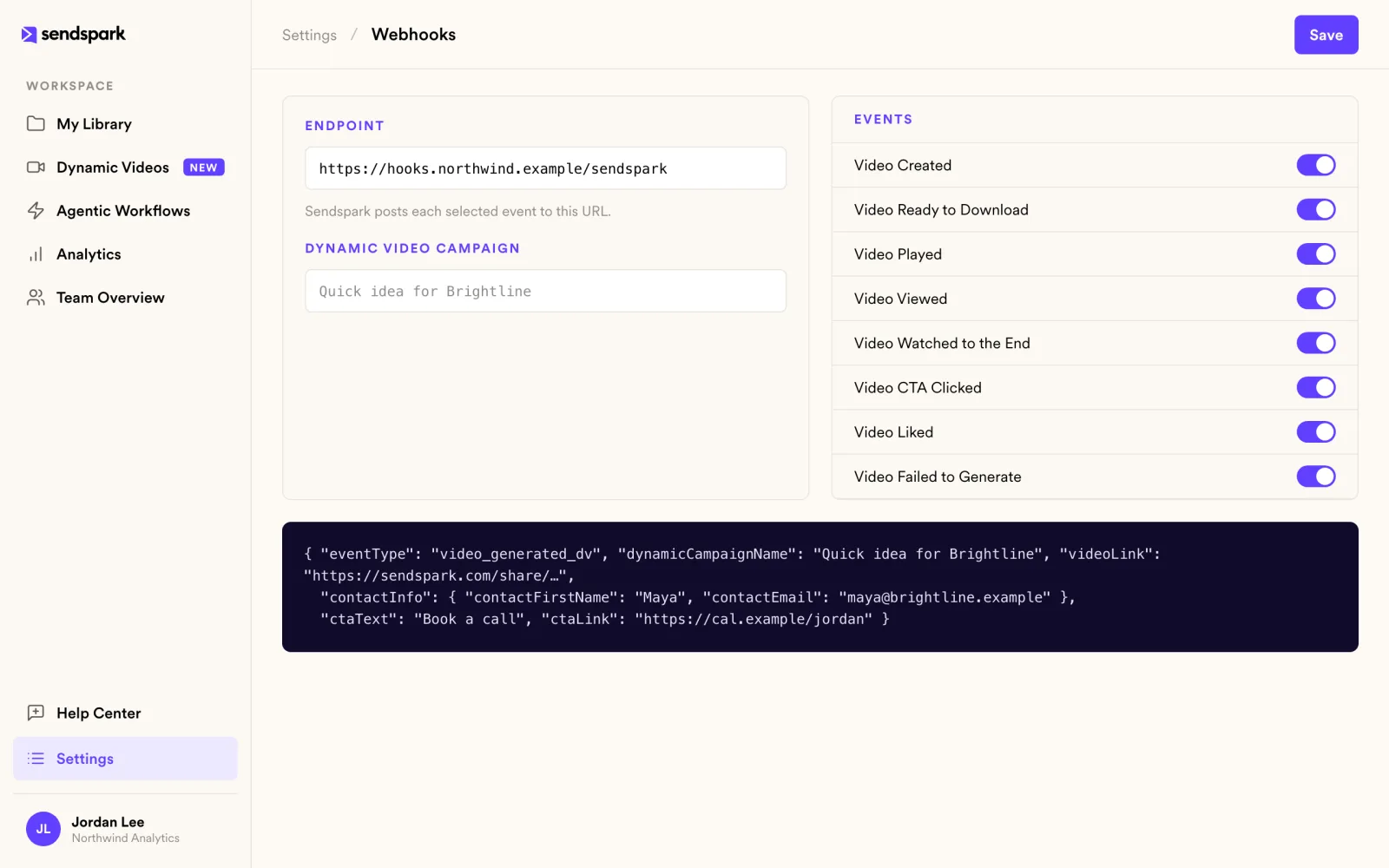
Sendspark posts eight events to your endpoint: video created, ready to download, played, viewed, watched to the end, CTA clicked, liked and failed to generate. Point them at your CRM, a sequencer or any URL. Available on Growth and above.
Get answers without opening a dashboard
The Sendspark MCP server connects Claude, ChatGPT or Cursor to your workspace. Ask about plays, watch time and clicks in plain language. Access is read-only.
Connect your AI assistant- Maya Chen Brightline Logistics92%
- Sam Ortiz Harbor & Pine78%
- Priya Nair Lumen Health64%
- Alex Morgan Fieldstone Capital55%
Eight events
| Event | Fires when |
|---|---|
| Video Created | A personalized video has been created for a contact. |
| Video Ready to Download | The video has finished processing and can be downloaded. |
| Video Played | A viewer pressed play. |
| Video Viewed | A viewer opened the video's landing page. |
| Video Watched to the End | A viewer watched the whole video. |
| Video CTA Clicked | A viewer clicked a CTA button. |
| Video Liked | A viewer liked the video. |
| Video Failed to Generate | A personalized video could not be generated. |
How it works
- 1
Create API credentials
Generate an API key and secret in the API Credentials tab of your settings, on Growth and above.
- 2
Add a prospect
Call the API to add a prospect to a dynamic video campaign.
- 3
Listen for events
Subscribe a webhook endpoint and act on views and clicks.
 Zapier
 Make
Make Clay
Clay RB2B
RB2B Warmly
 Expandi
 Salesforge
 HubSpot workflows
 Outreach
Goes well with
Frequently asked questions
What can I do with the Sendspark API?
Create dynamic, AI personalized videos by adding prospects to a campaign with your API key and secret. Each call creates a personalized video and landing page for one contact. Available on Growth and above.
Which webhook events are there?
Eight: video created, ready to download, played, viewed, watched to the end, CTA clicked, liked and failed to generate. Available on Growth and above.
What is the MCP server?
A connector for Claude, ChatGPT and Cursor. Once connected, you can ask questions about your video analytics in plain language. Access is read-only.
Can I automate without writing code?
Yes. Use Zapier, Make, Clay, RB2B, Warmly, Expandi, Salesforge, HubSpot workflows or Outreach.
Where are the docs?
At help.sendspark.com.
Updated
Make your next outreach personal.
Record one video and let Sendspark do the rest.
