Send AI personalized videos in La Growth Machine campaigns
You can send each La Growth Machine lead their own AI personalized video, on LinkedIn through Custom Att 1 or by email with the LGM snippet from Sendspark. Sendspark is an AI personalized video platform for B2B sales and marketing teams. Leads come into LGM from Sendspark's CSV or from Clay; nothing syncs back.
 SOC 2 Type II
- Read reviews on G2


Sendspark and La Growth Machine at a glance
- Integration type
- Video link via CSV or Clay, plus email snippet
- How data moves
- You import Sendspark's CSV (or send leads from Clay) into an LGM audience and use the video link or snippet in your campaign steps. Nothing syncs back to LGM.
- What you need
- A La Growth Machine account and a generated Sendspark Dynamic Video campaign; for the Clay route, the Sendspark and LGM integrations in Clay.
- Setup guides
- On La Growth Machine's side
- Sendspark on La Growth Machine Integrations
Your multichannel campaign sends the same note on every channel
LinkedIn and email steps both go out on schedule, and both sound automated. A personal video would help on either channel, but not if you have to record one per lead.
How to use Sendspark with La Growth Machine
- 1
Record once and say watermelon
Record your Dynamic Video and say 'watermelon' where each lead's first name goes; AI swaps in the name.
- 2
Export only the videos that generated
Click Export Generated Videos (CSV), which includes only contacts whose video was created.
- 3
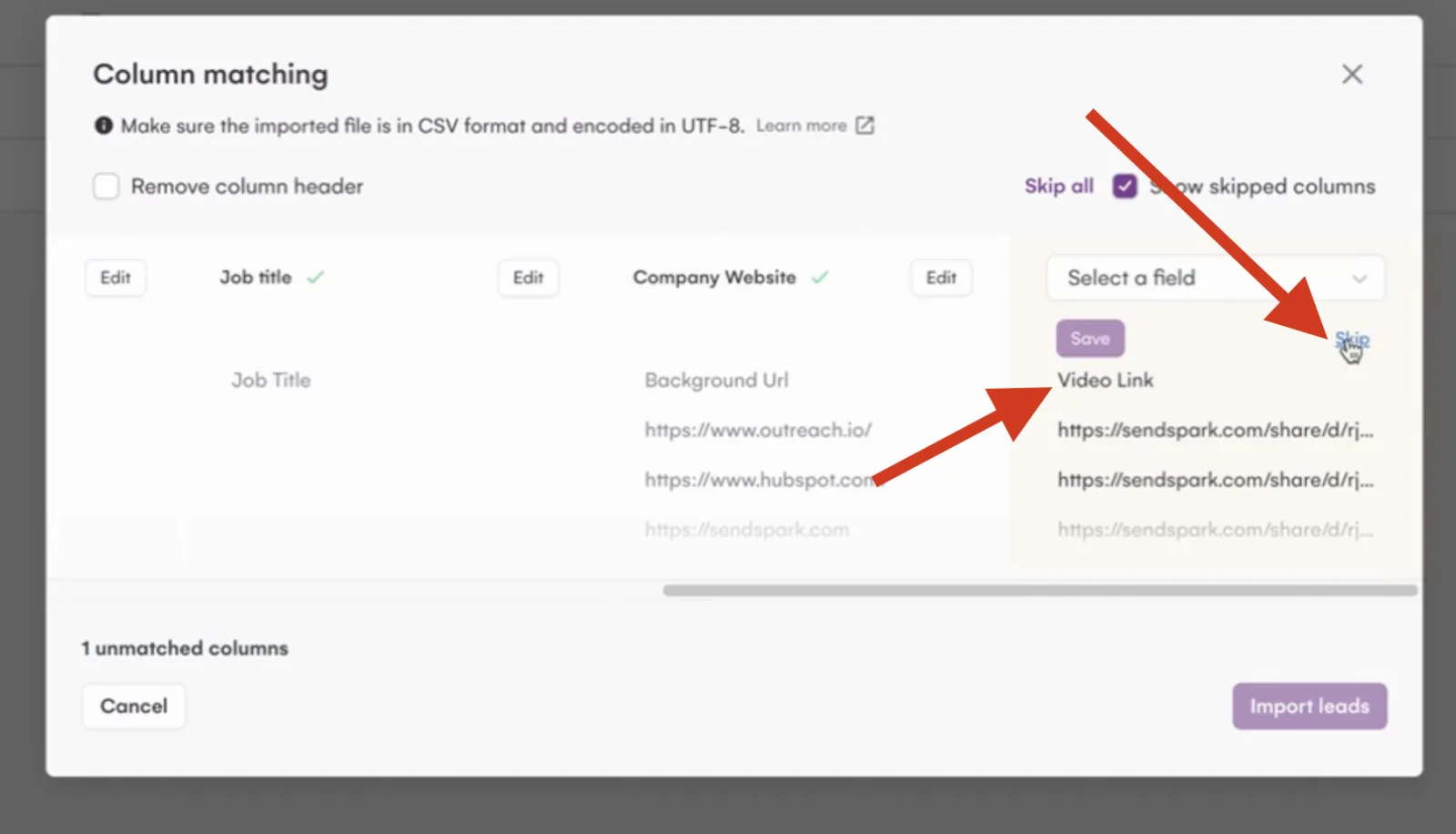
Import into LGM and map Video Link
In LGM, use Import leads, Import from CSV (UTF-8). Map Video Link to Custom Att 1 for LinkedIn, or skip it for email-only campaigns, then Import leads.
- 4
Use it in the campaign step
In a LinkedIn step, add {{customAttribute1}} to the message. In an email step, paste the LGM snippet from Share Campaign into the body, add a subject, save, and attach the audience.

What teams do with Sendspark and La Growth Machine
Website visitors get a LinkedIn video without anyone exporting a file
Find leads in Clay, generate videos with the Sendspark Clay integration, and make a column from Video Link once a row shows Success. Use Clay's LGM enrichment to add each lead to an audience with Video Link mapped to Custom Attribute 1, and auto-enroll that audience in your workflow.
Read the guideWhat La Growth Machine data personalizes each video
- Say 'watermelon' in the recording where the first name goes; AI voices each lead's name.
- LinkedIn steps use {{customAttribute1}} for the video link; email steps use the LGM snippet pasted into the body.
- LGM's own variables, such as {{firstname}}, sit alongside the video in the same message.
- Use the same list in both tools: videos match leads through the CSV.
Where you see who watched from La Growth Machine
Views, watch time, CTA clicks and likes are tracked in Sendspark, not in La Growth Machine.
Explore Video AnalyticsSendspark and La Growth Machine: frequently asked questions
Does Sendspark integrate with La Growth Machine?
Yes, through the CSV or Clay rather than a direct sync. Map Video Link to Custom Att 1 for LinkedIn steps, or paste the LGM snippet into email steps.
Which LGM field holds the video?
Custom Att 1. Reference it as {{customAttribute1}} in your LinkedIn message or connection request.
Why use Export Generated Videos instead of my own list?
It contains only contacts whose video was actually created, so no lead gets an empty link.
Updated


Make your next outreach personal.
Record one video and let Sendspark do the rest.
