vs
vs

Sendspark vs ScreenPal: Which Screen Recording Tool Is Right for Your B2B Sales Team?
TL;DR Verdict
Sendspark is purpose-built for B2B sales teams that need AI-powered video personalization at scale — record once, send hundreds of personalized videos automatically. ScreenPal is a budget-friendly screen recording and video editing tool best suited for educators, students, and small teams that need basic screen capture at the lowest possible price. They solve fundamentally different problems.
How We Evaluated
We compared Sendspark and ScreenPal across five criteria: core feature set, AI capabilities, pricing, integration ecosystem, and fit for B2B sales workflows. Ratings are sourced from verified G2 reviews (2025–2026). We've evaluated both platforms from the perspective of sales teams and individual business users evaluating video tools for prospect outreach.
Feature Comparison: Sendspark vs ScreenPal
Sendspark and ScreenPal overlap on exactly one feature — screen recording. Beyond that, they diverge completely. Sendspark is a sales engagement platform built for B2B outreach; ScreenPal is a screen capture utility built for individuals and educators. Here's how they compare across the features that matter most for sales teams evaluating video tools:
| Feature | Sendspark | ScreenPal |
|---|---|---|
| Screen recording | ✅ | ✅ |
| AI video personalization at scale | ✅ | ❌ |
| AI voice cloning | ✅ | ❌ |
| Dynamic prospect backgrounds | ✅ | ❌ |
| CRM integration (HubSpot, Salesforce) | ✅ | ❌ |
| Sales sequence automation | ✅ | ❌ |
| Per-recipient video analytics | ✅ | ❌ |
| Combined video (intro + demo) | ✅ | ❌ |
| Video editing tools | Limited | ✅ |
| Auto-captions / subtitles | Limited | ✅ |
| Quiz / assessment tools | ❌ | ✅ |
| LMS integrations | ❌ | ✅ |
| 50+ sales/marketing integrations | ✅ | ❌ |
| Free plan | 7-day trial | ✅ (15 min limit) |
Sales teams, note the gap: ScreenPal has no CRM integrations, no sales automation, and no per-recipient analytics. If you need to track whether a prospect watched your video and for how long — and feed that data back to HubSpot or Salesforce — ScreenPal simply can't do that. Sendspark was designed from the ground up for exactly this workflow.
Pricing Comparison: Sendspark vs ScreenPal
ScreenPal is one of the most affordable screen recording tools on the market — but it's priced for individuals and small teams, not B2B sales organizations. Sendspark's pricing reflects its position as a sales engagement platform with AI capabilities and enterprise-grade integrations.
| Plan | Sendspark | ScreenPal |
|---|---|---|
| Entry paid | Solo — $49/mo (1 seat, 5K videos, 100 AI credits) | Deluxe — $4/mo (1 seat, unlimited recordings) |
| Team plan | Growth — $99/mo (3 seats, API access) | Business — $8/user/mo (3+ users) |
| Business | Team — $299/mo (10 seats, dedicated onboarding) | Max — $10/mo (individual, advanced features) |
| Enterprise | Custom (SOC 2, RBAC, dedicated support) | N/A |
The pricing gap is significant at first glance but narrows quickly when you factor in outcomes. A sales rep who books 2 additional meetings per month from personalized video outreach — at an average deal value of $10,000+ — returns Sendspark's monthly cost many times over in a single week. The comparison is less about price-per-feature and more about whether you need a recording utility or a revenue tool.
ScreenPal's pricing starts at $4/month — among the lowest in any video software category. For a budget-conscious individual or small team that just needs screen recording, that's compelling. But ScreenPal has no AI features, no sales-specific workflows, and no CRM integrations at any price point.
Sendspark's pricing includes genuine AI capabilities — AI voice cloning, dynamic personalization at scale, and sales automation workflows — that don't exist in ScreenPal at any tier. For a sales rep sending 50+ personalized video outreaches per week, the ROI calculation quickly favors Sendspark despite the higher price.
Key Differentiators: Where Each Tool Wins
Where Sendspark Wins
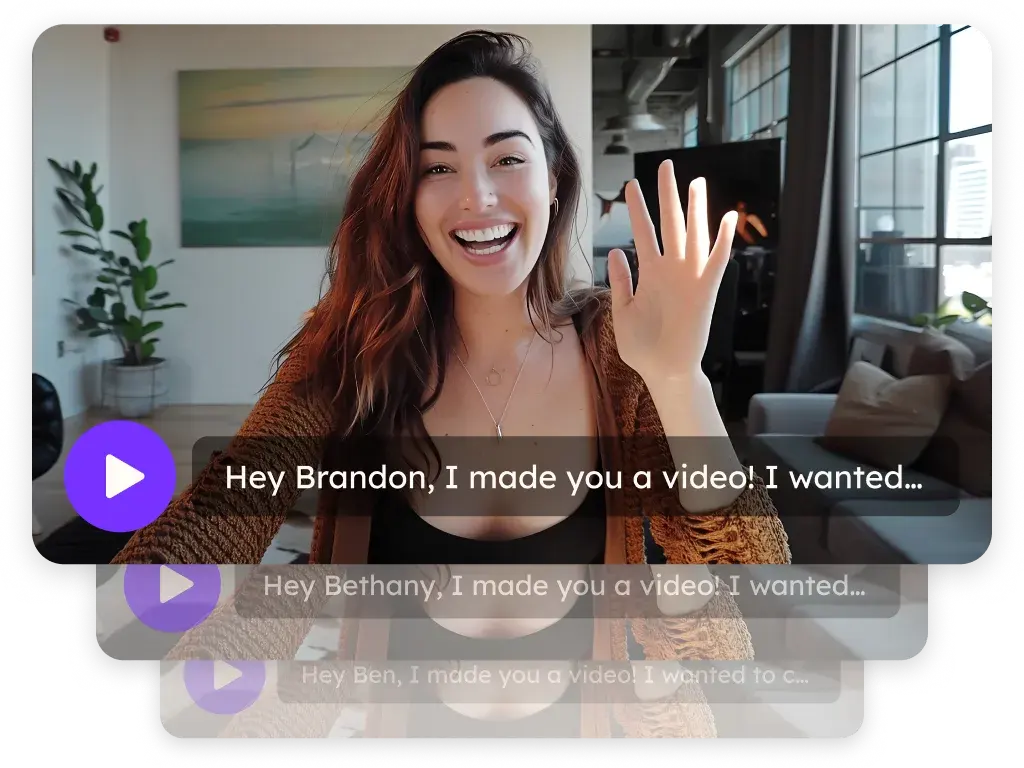
AI-powered personalization at scale is Sendspark's defining advantage over ScreenPal. Sendspark lets you record a single video and automatically generate personalized versions for every prospect — inserting their name, company, and even their website as a live background behind you. ScreenPal has no equivalent capability.
Sales teams report 200–300% higher email response rates when using personalized video outreach (Sendspark customer data). Recording individual videos for every prospect is time-prohibitive; Sendspark solves this with AI. ScreenPal offers no personalization at scale — every video you send is identical.
Sendspark's CRM integration is rated 5/5 on G2 for HubSpot, with bi-directional sync that feeds video engagement data (opens, plays, watch time, CTA clicks) back into deal records automatically. ScreenPal has zero CRM integrations. If your sales process depends on HubSpot or Salesforce, ScreenPal is not a viable option.
With 50+ platform integrations — Outreach, SalesLoft, Apollo, Clay, ZoomInfo — Sendspark plugs into the modern sales stack. ScreenPal integrates primarily with YouTube and some LMS platforms, neither of which are relevant for B2B sales outreach.
Where ScreenPal Wins
Price is ScreenPal's clearest advantage. At $4/month for unlimited screen recordings, ScreenPal is 12x cheaper than Sendspark's entry plan. For individuals or teams that need a quick screen recording tool for internal communication, tutorials, or simple demos — and don't need sales automation — ScreenPal delivers real value at minimal cost.
Education and assessment features are ScreenPal's specialty. Built-in quiz and assessment tools, LMS integrations (Google Classroom, Canvas, Blackboard), and video libraries make ScreenPal a better fit for educators and training teams than any sales-focused tool including Sendspark. If you're building training content or student assessments, ScreenPal is the right choice.
Video editing capabilities are more robust in ScreenPal than in Sendspark. Trimming, annotations, screen drawing, and noise reduction are all available. Sendspark is optimized for quick video creation and delivery, not post-production editing.
Outreach integrations are where the gap is most stark. Sendspark integrates with Outreach, SalesLoft, Apollo, and Clay — the core tools in modern B2B sales stacks. A sales rep can trigger a personalized Sendspark video from within an Apollo sequence with zero manual recording. ScreenPal has no equivalent integrations. Its YouTube integration is designed for public content publishing, not B2B prospect outreach.
Analytics depth also differs substantially. Sendspark tracks per-recipient engagement: who opened the video email, how long they watched, whether they clicked the CTA, and at what timestamp they dropped off. These signals surface warm prospects for prioritized follow-up and automatically update HubSpot deal stages. ScreenPal shows basic view counts at the video level with no recipient-level tracking — unsuitable for qualifying inbound interest from prospects.
The real question: Are you trying to close deals or create training content? ScreenPal is a capable tool for the latter. For B2B sales outreach where personalization, CRM sync, and reply rates matter, Sendspark is the purpose-built choice.
See AI Personalization in Action
Record once and send hundreds of personalized video emails — no manual recording per prospect required.
Try Sendspark Free →Which Should You Choose?
The choice between Sendspark and ScreenPal depends entirely on your use case. These tools serve fundamentally different audiences, and the right pick is usually obvious once you're clear on what you need.
Choose Sendspark if you need to:
- Send personalized video outreach to hundreds of prospects without recording each one individually
- Track whether prospects opened, watched, and clicked your video — and sync that data to HubSpot or Salesforce
- Integrate video into Outreach, SalesLoft, or Apollo sequences
- Clone your voice to auto-generate personalized greetings at scale
- Show a prospect's own website or LinkedIn profile as a background in your video
- Run a B2B sales team of 3–25+ reps that needs shared video templates and team analytics
Choose ScreenPal if you need to:
- Record your screen for tutorials, training videos, or product walkthroughs at the lowest possible cost
- Create educational content with quizzes, assessments, and LMS integrations
- Record and share videos for internal team communication without a sales workflow requirement
- Get started with screen recording as an individual for under $5/month
- Build video libraries for student or customer education without any CRM integration
A practical note for teams evaluating both: if you have individual contributors who need screen recording for both sales outreach and training content creation, consider running both tools in parallel — ScreenPal for internal training videos at $4/month, Sendspark for prospect-facing outreach. The overlap is minimal and the cost of both together is less than $55/month per person.
There's a third scenario worth naming: teams that currently use ScreenPal for basic sales demos and are starting to hit the limits of generic video outreach. A generic screen recording tool like ScreenPal can't personalize each video for each prospect, and Sendspark was built specifically for this gap.
What Real Users Say
Sendspark User Feedback
Sales teams consistently highlight Sendspark's AI personalization as the standout feature. Verified G2 reviewers frequently describe the dynamic background feature — where a prospect's own website appears live behind the presenter — as a "conversation starter" that prospects notice and respond to. HubSpot integration receives strong praise for the bi-directional sync that keeps deal records updated automatically after video views.
Common G2 themes from Sendspark users: faster ramp time for SDRs building their video outreach, measurable reply-rate improvements in the first 30 days, and strong customer support during onboarding. A minority of reviewers note that the AI credit model requires careful planning for high-volume teams, and that mobile recording is less polished than desktop.
ScreenPal User Feedback
ScreenPal's reviews reflect its educational user base. Teachers and trainers consistently praise the quiz and assessment features and the simple, low-cost interface. Business users appreciate the ability to record unlimited screen captures at minimal cost. Negative reviews frequently cite the interface feeling dated compared to modern tools, limited cloud storage on lower tiers, and the absence of any collaboration or CRM features.
Sales professionals who have tried ScreenPal for outreach commonly note that the lack of tracking — there's no way to know if a prospect watched your video — makes it difficult to prioritize follow-ups. This is one of the most-cited reasons sales teams migrate away from ScreenPal toward dedicated sales video tools like Sendspark, Vidyard, or BombBomb.
How to Switch from ScreenPal to Sendspark
Switching from ScreenPal to Sendspark is straightforward because the two tools don't share data or integrations — there's nothing to migrate except your habits. Most sales teams are fully operational with Sendspark within a day of signing up.
Step 1 — Sign up and connect your CRM (Day 1). Create your Sendspark account at sendspark.com/signup. Connect HubSpot or Salesforce via the Integrations tab. This takes 5–10 minutes and unlocks automatic video engagement sync to deal records.
Step 2 — Record your first reusable demo (Day 1). Record a single high-quality product demo or introduction video that you'll personalize for each prospect. This is the "record once" video that Sendspark's AI will personalize at scale. Keep it under 3 minutes for highest engagement.
Step 3 — Set up AI personalization (Day 1–2). Upload your prospect list or connect to your CRM to pull contacts. Configure your personalization variables — prospect name, company, and optional website background. Run a test batch of 5–10 personalized videos to validate the output before scaling.
Step 4 — Connect to your sales sequence tool (Day 2–3). If you use Outreach, SalesLoft, or Apollo, connect Sendspark via the integrations panel. This embeds personalized video links directly into your sequences without manual video creation per contact.
Step 5 — Archive your ScreenPal recordings (optional). ScreenPal doesn't export to a universal format that Sendspark can ingest directly. Download any recordings you want to keep from ScreenPal and upload them to your preferred storage. Most sales teams find that their existing ScreenPal recordings are no longer relevant once personalized video outreach replaces generic demos.
Time estimate: Full migration is typically 2–4 hours of setup, with measurable results in the first week of personalized outreach.
What doesn't transfer: ScreenPal has no integration with Sendspark. Video view data from ScreenPal is not importable. Recording history stays in ScreenPal's cloud. If you have important training or tutorial videos on ScreenPal, download them first before canceling your subscription.
Frequently Asked Questions
Is Sendspark better than ScreenPal for sales outreach?
Yes — Sendspark is purpose-built for B2B sales outreach with AI personalization, CRM sync, and sales sequence integrations. ScreenPal is a screen recording tool with no sales-specific features, no CRM integration, and no video analytics per recipient. For sales use cases, Sendspark is the significantly stronger tool.
Does ScreenPal have AI personalization features?
No. ScreenPal does not offer AI video personalization, AI voice cloning, or dynamic prospect backgrounds. Every video recorded in ScreenPal is identical for all recipients. Sendspark's AI personalizes each video with the recipient's name, company, and website automatically.
What is the difference between Sendspark and ScreenPal?
Sendspark is a sales engagement platform for B2B video outreach at scale. ScreenPal is a budget-friendly screen recording utility for educators and small teams. They share screen recording as a feature but serve completely different use cases — sales automation vs. affordable content capture.
How much does ScreenPal cost compared to Sendspark?
ScreenPal starts at $4/month for unlimited recordings. Sendspark starts at $49/month for 1 seat with AI credits. The price difference reflects fundamentally different feature sets — ScreenPal is a recording utility, Sendspark is an AI sales platform with CRM integrations and personalization at scale.
Can ScreenPal integrate with HubSpot or Salesforce?
No. ScreenPal has no native CRM integrations. It does not connect to HubSpot, Salesforce, Outreach, SalesLoft, or Apollo. Sendspark offers bi-directional HubSpot integration rated 5/5 on G2, plus Salesforce and 50+ other sales tool integrations.
Do I need to switch from ScreenPal to Sendspark?
If you're using ScreenPal primarily for education or internal training, you don't need to switch — ScreenPal is well-suited for that. If you're using ScreenPal for B2B sales outreach and want to personalize at scale, track engagement, and sync data to your CRM, Sendspark is the right upgrade.
How long does it take to switch from ScreenPal to Sendspark?
Most sales teams are fully operational with Sendspark within 2–4 hours: account setup, CRM connection, and recording the first reusable demo. The first batch of personalized video outreach can go out on Day 1.
Sources & References
- G2 — Sendspark Reviews — 4.8/5 rating based on 350+ verified user reviews (2026)
- G2 — ScreenPal Reviews — 4.5/5 rating based on 130+ verified user reviews (2026)
Ready to upgrade from generic screen recording to personalized sales video?
Sendspark has powered 50,000+ campaigns that book more meetings with AI-powered video personalization — no individual recording required.
Get Started Free →No credit card required • Set up in 2 minutes
Explore More Comparisons
Updated August 2026