vs
vs

TL;DR Verdict
Sendspark is built for async personalized video sales outreach — AI voice cloning, dynamic prospect backgrounds, and deep CRM integrations make it the go-to for SDRs doing high-volume outbound. Zoom is a live video conferencing and UCaaS platform — essential for discovery calls, demos, and internal meetings. These tools solve different problems. Most B2B sales teams use both: Zoom for live meetings, Sendspark for personalized async video prospecting.
Sendspark on G2
4.8 ★
350+ reviews
Zoom on G2
4.5 ★
55,000+ reviews
How we evaluated this comparison: We assessed both platforms across six criteria: video personalization for sales outreach, live meeting and collaboration capabilities, CRM and sales tool integrations, pricing value for B2B sales teams, G2 verified user ratings, and per-recipient video analytics. We focused on the B2B sales use case, where the two products serve fundamentally different — but often complementary — purposes.
Feature Comparison: Sendspark vs Zoom
Sendspark and Zoom overlap in one narrow area — both can produce a video — but their core capabilities point in entirely different directions. Zoom is built for live synchronous communication; Sendspark is built for async personalized outreach at scale. The table below shows exactly where each product leads and where it falls short for B2B sales teams.
| Feature | Sendspark | Zoom |
|---|---|---|
| AI video personalization at scale | ✓ | ✗ |
| AI voice cloning | ✓ | ✗ |
| Dynamic prospect backgrounds (website/LinkedIn) | ✓ | ✗ |
| CRM bi-directional sync (HubSpot, Salesforce) | ✓ | ✗ |
| Sales sequence automation (Outreach, SalesLoft, Apollo) | ✓ | ✗ |
| Per-recipient video analytics (opens, plays, CTAs) | ✓ | ✗ |
| Combined video (personalized intro + reusable demo) | ✓ | ✗ |
| Live video meetings & conferencing | ✗ | ✓ |
| Webinar platform | ✗ | ✓ |
| Phone / UCaaS system | ✗ | ✓ |
| AI meeting summaries & transcripts | ✗ | ✓ (AI Companion) |
| Whiteboard collaboration | ✗ | ✓ |
| Screen recording (async) | ✓ | Limited |
| Free tier available | ✗ | ✓ (40-min meetings) |
Pricing Comparison: Sendspark vs Zoom
Zoom and Sendspark price for entirely different capabilities, so a direct comparison requires context. Zoom's pricing reflects a full unified communications suite — meetings, phone, webinars, team chat, and whiteboards — starting at $13.33/seat/month. Sendspark's pricing reflects AI personalization infrastructure — voice cloning, background rendering, CRM sync, and per-recipient analytics — starting at $49/month for one seat. For sales teams, the relevant comparison is total cost for the combined stack, since most teams need both.
| Plan | Sendspark | Zoom |
|---|---|---|
| Free | — | $0/mo · 40-min meetings |
| Solo / Pro | $49/mo · 1 seat · 5K videos · 100 AI credits | $13.33/mo/seat · 30-hr meetings · cloud recording |
| Growth / Business | $99/mo · 3 seats · 20K videos · API access · AI personalization | $18.32/mo/seat · 10+ seats · SSO · managed domains |
| Team / Business+ | $299/mo · 10 seats · 100K videos · advanced integrations | Custom pricing · Zoom Phone included |
| Enterprise | Custom · SOC 2 · RBAC · dedicated support | Custom · advanced security · compliance |
Zoom pricing from zoom.us/pricing. Sendspark pricing at sendspark.com/pricing. Prices current as of March 2026.
How most sales teams budget for both tools
A 5-person SDR team typically runs Zoom Pro at ~$67/month (5 seats × $13.33) plus Sendspark Growth at $99/month — about $166/month total for both live meetings and personalized async video prospecting. That's roughly $33/rep/month for the full video sales stack.
Key Differentiators
The core distinction is synchronous vs. asynchronous video. Zoom handles the live meeting moments of the sales cycle. Sendspark handles everything between meetings — the outreach that books them, the follow-up that moves deals forward, and the personalized video that makes reps stand out in crowded inboxes.
Where Sendspark Wins
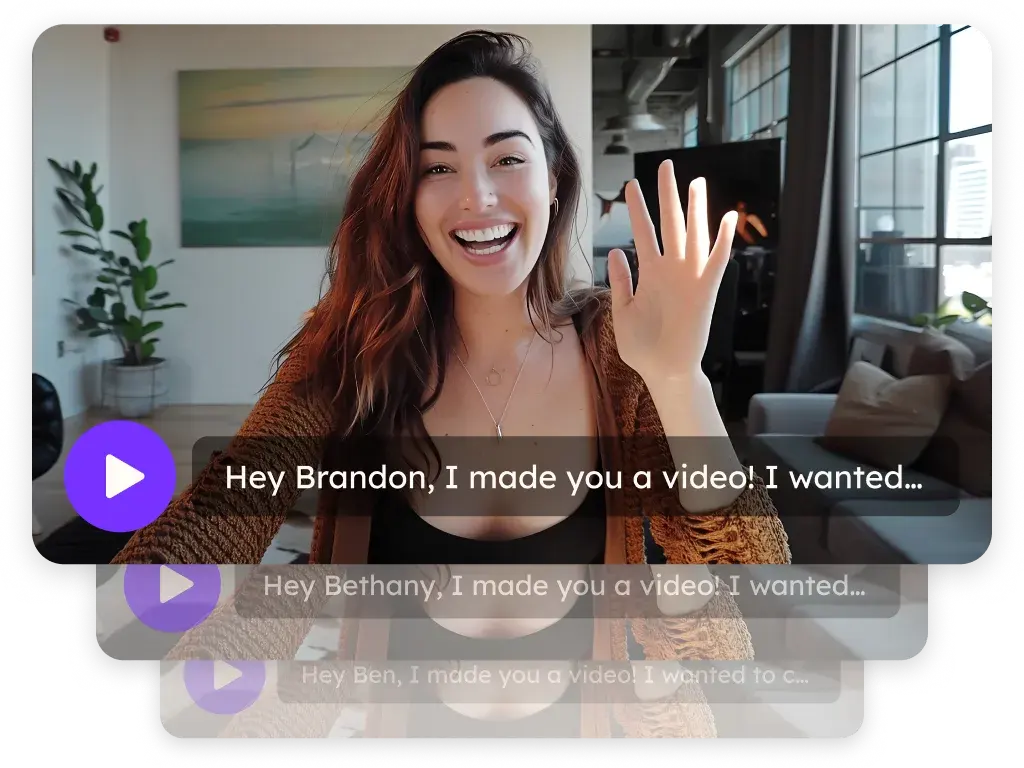
AI-powered personalization at scale is what separates Sendspark from every other video tool, including Zoom. Sales reps record a single video once, and Sendspark's AI automatically personalizes it for each prospect — inserting their name, company name, and a live rendering of their website or LinkedIn profile into the video background. Most tools still require reps to record individual videos per prospect. Sendspark eliminates that bottleneck.
Per-recipient video analytics give sales reps and managers visibility that Zoom's recording tools simply don't provide. When a rep sends a personalized video to 50 prospects, Sendspark tracks who opened the email, who played the video, how much they watched, and whether they clicked the CTA — per person. This data flows back into HubSpot or Salesforce automatically, giving reps genuine signal for follow-up prioritization. Zoom provides aggregate meeting attendance data, not per-recipient outreach analytics.
Sales sequence integration is a workflow that Zoom recording cannot replicate. Sendspark connects directly with Outreach, SalesLoft, and Apollo so personalized videos trigger automatically within existing sequences — no manual steps per prospect. Teams using automated video sequences report saving 10+ hours per campaign compared to recording individual follow-up clips. Zoom has no native integration with outbound sales sequencing platforms.
Combined video workflow is a Sendspark-specific capability: record a personalized intro once, merge it with a reusable product demo, and send a single cohesive video. This solves the "show the product vs. stay personal" tradeoff that forces most reps to choose between a generic demo and a fully personalized but incomplete message. See video prospecting examples that illustrate how combined videos perform in outbound sequences.
Where Zoom Wins
Live video meetings are Zoom's undisputed strength. For discovery calls, live product demos, QBRs, and any moment where real-time interaction matters, Zoom is the established standard. With 55,000+ reviews on G2 and 4.5/5 rating, its reliability and ubiquity mean virtually every prospect already has the client installed. Sendspark has no live meeting capability whatsoever — it's strictly for async video.
Webinars and large-format presentations are core Zoom capabilities. Zoom Webinars supports up to 1,000 attendees with registration, Q&A, and post-event recordings. For demand generation teams running regular webinars as a pipeline channel, Zoom's webinar functionality is a significant asset with no equivalent in Sendspark's product.
AI Companion for meetings gives Zoom users automatic meeting summaries, transcripts, and action items after every call. For sales teams managing a high volume of discovery calls and follow-up commitments, this reduces the manual note-taking burden significantly. Sendspark's AI is focused on personalization — it doesn't transcribe or summarize live meetings.
Unified Communications (UCaaS) makes Zoom the all-in-one platform for organizations that want meetings, phone, team chat, and whiteboarding under one subscription and one IT admin layer. For enterprise sales teams operating within a Zoom-standardized organization, this reduces tool sprawl. Sendspark is purpose-built for outbound video outreach — it doesn't replace a communications infrastructure.
Zoom handles your meetings. Sendspark handles everything between them.
Record once, personalize for every prospect automatically — no individual recordings required.
Try Sendspark Free →Which Should You Choose?
The decision isn't really Sendspark or Zoom — it's Sendspark and Zoom for different jobs. Here's how to think about it:
Add Sendspark to your stack if you…
- Send outbound video prospecting emails to cold or warm leads
- Want video engagement data in HubSpot or Salesforce automatically
- Run an SDR/BDR team doing high-volume prospecting sequences
- Need to personalize video for 10+ prospects without recording each individually
- Use Outreach, SalesLoft, or Apollo for sequencing
- Want to follow up after a Zoom discovery call with a personalized video recap
Zoom alone may be enough if you…
- Do primarily inbound sales with no outbound video prospecting
- Run a very low-volume sales process (under 5 prospects per week)
- Need a phone system and webinar platform as your primary video investment
- Are evaluating video tools for internal communication only
- Already use Loom for async video and need conferencing on top of it
The sales teams getting the most out of video in 2026 use Zoom for live touchpoints and a dedicated tool like Sendspark for personalized async outreach between meetings. View the full Sendspark comparison hub to see how it stacks up against other tools in your current stack, including Loom, Vidyard, and BombBomb.
What Real Users Say
On G2, Sendspark reviewers consistently highlight response rate improvements and the ease of scaling personalized outreach. Sales reps who previously relied on Zoom recordings for follow-up messages report a clear difference: Sendspark videos with personalized intros and dynamic backgrounds get significantly more replies than a Zoom cloud recording link. The CRM integration quality — specifically the HubSpot sync rated 5/5 — is a frequently cited advantage for teams that need video data in their CRM without manual logging.
Zoom's 55,000+ G2 reviews reflect its market-leading position in video conferencing. Sales teams rate Zoom highly for call quality, reliability, and the breadth of features for live meetings. Where Zoom receives mixed reviews in sales contexts is for post-meeting follow-up: users note that sharing a Zoom recording link feels impersonal, lacks engagement analytics, and doesn't integrate with CRM or sequencing tools the way a purpose-built video sales tool would.
What sales teams say about using both tools together
Sales teams that use both Zoom and Sendspark describe a clear division: Zoom owns the live meeting stage of the pipeline, and Sendspark owns everything between meetings. A common pattern: send a Sendspark personalized video to book the meeting → run the discovery call on Zoom → follow up with another personalized Sendspark video that references the call and includes a tailored next step.
Teams that try to use Zoom recordings as a substitute for personalized async video outreach consistently report lower engagement. A Zoom recording link doesn't have a custom thumbnail with the prospect's name, doesn't show their website in the background, and doesn't track whether they actually watched more than 10 seconds. These gaps are where Sendspark's per-recipient analytics become a genuine competitive advantage.
How to Add Sendspark to Your Zoom Workflow
Unlike switching from one tool to a direct replacement, adding Sendspark alongside Zoom is additive — you keep Zoom for everything it does well and add Sendspark for async personalized outreach. Here's how to integrate both effectively:
- Sign up for Sendspark — Create your Sendspark account. No credit card required. You can keep Zoom running during your entire Sendspark trial — the two tools don't conflict.
- Record your prospecting video — Record the core message you'd send to cold or warm prospects. This becomes the template Sendspark's AI personalizes for each prospect on your list. One recording serves your entire outreach sequence. See the video prospecting guide for script frameworks.
- Connect your CRM — Link HubSpot or Salesforce through Sendspark's integration settings. Video opens, plays, and CTA clicks will start flowing back to contact records automatically — data Zoom recordings never provided.
- Upload your prospect list — Import names, companies, and website URLs. Sendspark generates a personalized version of your video for each record using your cloned voice and dynamic prospect backgrounds.
- Connect your sequencing tool — Integrate with Outreach, SalesLoft, or Apollo to trigger personalized video emails directly from your existing sequences. Zoom remains your tool for the live meeting once the video books the call.
- Use Sendspark for post-Zoom follow-ups — After a Zoom discovery call, send a Sendspark video follow-up that references the conversation and includes a personalized next step. This combination — live Zoom call + personalized Sendspark follow-up — consistently outperforms text-only follow-up email. Read more on follow-up email after a sales call strategies.
Estimated setup time: Most reps record their first Sendspark campaign and send their first batch within the same afternoon. CRM integration takes about an hour. Sequencing tool connection takes another 30 minutes.
Pro tip: Zoom + Sendspark for mid-funnel acceleration
Use Sendspark's combined video feature to merge a personalized intro ("Hi [Name], following up on our call last Tuesday...") with a reusable product demo clip. This lets you send a highly personalized follow-up that also walks the prospect through the specific use case you discussed on Zoom — without recording a fresh video for each person. Read about cold email follow-up best practices that incorporate video for higher reply rates.
Frequently Asked Questions
Is Sendspark or Zoom better for B2B sales video outreach?
Sendspark is purpose-built for B2B async video sales outreach. It personalizes video with each prospect's name, company, and live website background automatically. Zoom is a live conferencing tool — its recording features are incidental, not designed for personalized outbound prospecting campaigns.
Can I use Zoom recordings instead of Sendspark for sales prospecting?
Zoom cloud recordings work for sharing post-meeting recaps, but they don't support AI personalization, per-recipient analytics, or CRM sync for outbound prospecting. For high-volume sales video outreach, Sendspark is the dedicated tool. Most teams use both: Zoom for live calls, Sendspark for async personalized prospecting between meetings.
How does Sendspark compare to Zoom on pricing for sales teams?
Zoom Pro costs $13.33/seat/month for live meetings. Sendspark Solo starts at $49/month for personalized async video outreach with AI personalization and CRM sync. They're priced for different capabilities — a 5-person team runs both for roughly $33/rep/month combined, covering the full live + async video sales stack.
What does Sendspark do that Zoom cannot?
Sendspark personalizes video for each prospect automatically using AI — inserting their name, company, and live website into the video. It provides per-recipient analytics (who watched, how long, what they clicked), CRM bi-directional sync, and integration with Outreach, SalesLoft, and Apollo. None of these capabilities exist in Zoom.
Do sales teams use both Zoom and Sendspark?
Yes — most B2B sales teams use both. Zoom handles live discovery calls, demos, and QBRs. Sendspark handles personalized async outreach: cold prospecting videos that book the meeting, follow-up videos after the Zoom call, and mid-funnel personalized demos. The two tools address different stages of the sales cycle.
How long does it take to set up Sendspark for a sales team already using Zoom?
Most reps record their first Sendspark video within 20 minutes of signing up. CRM integration (HubSpot or Salesforce) takes about an hour. Connecting Outreach or SalesLoft sequences adds another 30 minutes. Sendspark runs alongside Zoom — no migration or replacement process required.
Sources & References
- G2 — Sendspark Reviews — Aggregate rating 4.8/5 from 350+ verified B2B sales users (2026)
- G2 — Zoom Workplace Reviews — Aggregate rating 4.5/5 from 55,000+ verified users; reviewer segments include sales, IT, and operations (2026)
Ready to Personalize Video Outreach Alongside Your Zoom Workflow?
Record once, let Sendspark's AI personalize it for every prospect — with their name, company, and website in the video automatically.
Get Started Free →No credit card required • Set up in 2 minutes
Compare more tools: Full comparison hub · Sendspark vs Loom · Sendspark features · Sendspark pricing · Video prospecting examples · Sales cadence best practices
Updated August 2026